The Cost of Watching Everything
Every system generates events. That's not a design flaw — that's the job. But send that same system at the same request a thousand times a second or flood it with enough variety that nothing repeats exactly, and logging every single instance stops being useful and starts being a liability.
We've seen this play out directly in our own load testing: sustained attack traffic alone can push CPU utilization past 90% before a single mitigation decision has even been made. Every log entry written past that point is CPU time that isn't going toward stopping the attack. For too long, the instinct in security systems has been “log everything, sort it out later.” But logging has a cost, and under real attack conditions, that cost gets paid in exactly the resources you need most: CPU, memory, bandwidth.
We call our answer to this Layered Suppression, and the idea is simple: keep detecting everything, but stop paying full price to write down what's already been said once.
What's Actually Different Here
Suppression as a concept isn't new, and we're not claiming otherwise — merged alerts and rate-limited logs show up all over the software world, as we said above. What's different about our approach is where it lives.
Most ways of taming log volume sit downstream: a log-management layer ingests everything the security engine produces, then filters, samples, or aggregates it after the fact. That works, but it means the full-fidelity flood still has to be generated, written, and shipped somewhere before anything gets thinned out — the enforcement engine itself never gets the CPU and I/O back.
Layered Suppression is built directly into the detection and enforcement engine itself — not as a downstream log-management feature bolted on afterward. The suppression decision happens in the same place, and at the same time, as the detection decision. That's what actually frees up CPU under attack: the engine never generates the redundant entry in the first place, rather than generating it and filtering it out one hop later.
The Three Layers
Layered Suppression works because no single mechanism catches every failure mode on its own. Each layer exists to close the gap the one before it leaves open.
The first layer is Static Suppression, built for the simplest and most predictable kind of noise: the same event, from the same source, over and over. Picture an attacker sending the same SQL-injection payload from the same IP address once a second for two minutes straight. Instead of writing 120 nearly identical log lines, the system logs the first occurrence, holds every repeat in memory for a configurable window, and writes one consolidated entry once that window closes — “1 event, +119 suppressed occurrences” instead of 120 separate lines. High-priority events can be left unsuppressed even while everything routine gets condensed, because suppression is configured per event type and per source.
The second layer is Dynamic Suppression, and it exists because static suppression only helps once a pattern has already been identified and configured for — real attacks don't wait for that. Dynamic Suppression doesn't care what an event looks like, only how fast it's arriving. Cross a flow-rate threshold, and the system stops writing detailed entries for that event type for a configurable window, counting quietly in memory until the rate falls back to normal. A system-wide counter sits above the per-event thresholds, so if total volume across every type spikes at once, everything gets suppressed together, not just the one type that triggered it. This is the layer that protects a system in the moments before anyone has had the chance to tune it.
The third and final layer is Global Suppression, and it's the circuit breaker for the scenario neither of the first two layers is built for: not one event type spiking, but everything spiking at once. Even well-suppressed logs still cost something to produce, and under a truly extreme attack, that cost can compete with the system's actual job of inspecting and blocking traffic. When overall event volume crosses what the system can reasonably process, Global Suppression suppresses security-event logging across the board, dedicates CPU capacity to mitigation instead of reporting, and resumes normal logging automatically once conditions ease. Protection comes first. Reporting waits its turn.
Additional Challenges to Tackle
The layered approach makes sense on paper. Getting it right in practice raised a few questions worth answering directly rather than glossing over.
Isolating the Variable
To measure Global Suppression on its own, we needed to rule out the other two layers doing the work instead. Our test traffic used wide client IP ranges specifically so that Static and Dynamic Suppression would not themselves trigger — whatever difference showed up in CPU, throughput, or bandwidth could be attributed to Global Suppression alone.
The Heavy-Load Wrinkle
At our heaviest tested load, CPU utilization barely moved — 94% without Global Suppression versus 95% with it. Taken on its own, that looks like the mechanism stopped working right when it mattered most. It didn't. The system was already running flat-out either way, with no CPU headroom left to give back. What changed was what that maxed-out CPU budget was spent on — and that shows up in throughput, not in the CPU chart. We'd rather flag that plainly than let a clean-looking average paper over it.
Configured, Not Guessed
Dynamic Suppression's flow-rate threshold and Global Suppression's system-wide counter both ship with sensible defaults (in the neighborhood of 100 events per minute per type, a five-minute suppression window, and a 400-events-per-minute global counter) — but they're configurable, not fixed. Environments with naturally higher baseline event rates should tune these rather than assume the defaults fit every deployment.
Putting It to the Test
We didn't take any of this on faith — we tested it. To isolate Global Suppression specifically, we ran two otherwise-identical builds side by side under sustained, 100% attack traffic: one with Global Suppression enabled, one without. Two load levels were tested — a moderate load of 8 simulated users, and a heavy load of 15 — measuring CPU, memory, throughput (CPS), and bandwidth in each case.
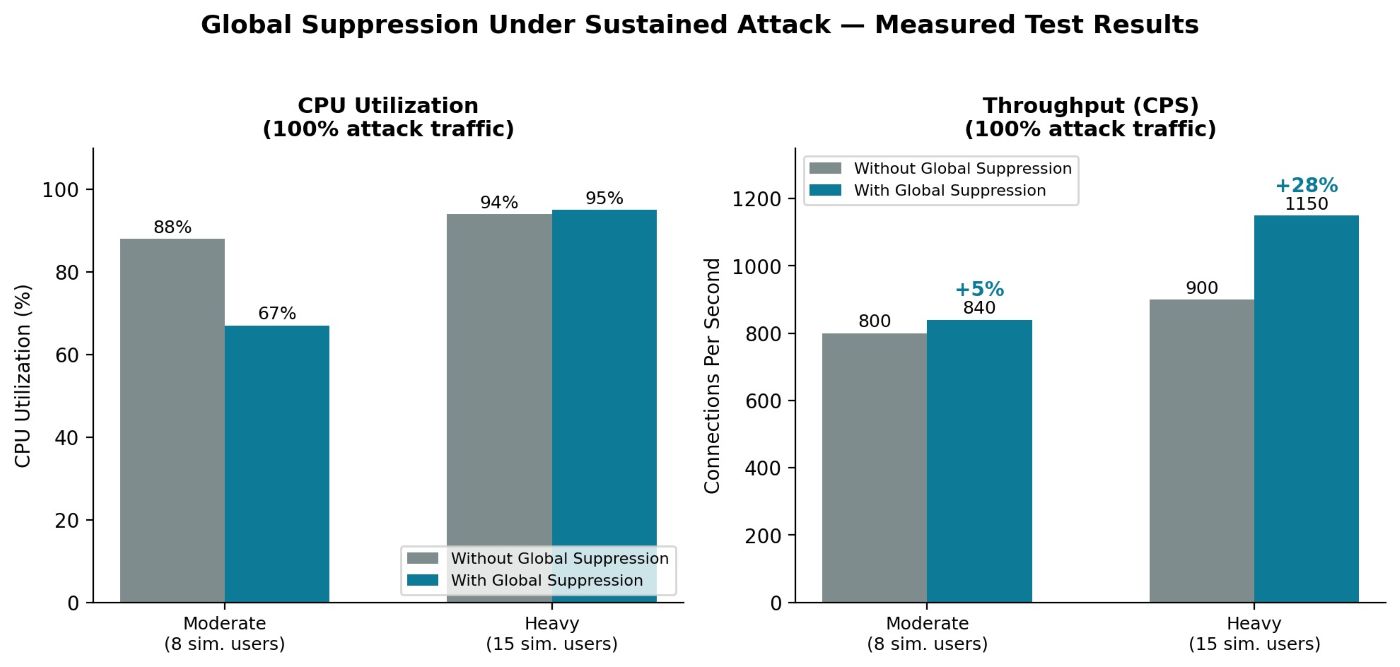
Figure 1: Measured impact of Global Suppression under 100% attack traffic, at two load levels. At moderate load, CPU drops roughly 21 points and throughput rises 5%. At heavy load, CPU barely moves — but throughput still rises 28%.
At moderate load, the result is exactly what you'd want: CPU utilization drops from 88% to 67%, and throughput rises about 5%. At heavy load, the CPU story flattens out for the reason we called out above — but throughput still climbs 28%, and bandwidth climbs 30%, with memory utilization holding flat at 1% in every configuration tested. Under the heaviest load we threw at it, Global Suppression didn't lower the bill. It changed what the bill was paying for.
Summary — Why Layered Suppression Matters
Put together, here's what three layers of suppression deliver under real attack conditions:
- Integrated on AppWall: suppression decisions happen inside the same engine that's doing detection and enforcement, not in a downstream log-management.
- Lower CPU Overhead Under Attack: suppression reclaims CPU cycles that would otherwise go toward writing near-duplicate log entries.
- Higher Sustained Throughput, Same Hardware: the same footprint processes more legitimate connections per second once logging overhead is under control.
- No Manual Tuning Required to React: Dynamic and Global Suppression both engage automatically, without a human operator identifying the pattern first.
- Logs That Stay Readable: consolidated entries and periodic summaries replace walls of near-identical lines, without losing the underlying count.
If your systems are logging their way into a performance problem during the moments that matter most, it's worth asking whether your observability stack is helping you respond to an attack — or just keeping a very detailed diary of it.