Radware AMS is a world-leading DDoS Attack Mitigation Service. Part of AMS is Cyber Controller (CC), Radware’s centralized security management platform. CC provides a single pane of glass for managing DDoS protection, mitigation policies, analytics and operations across DefensePro, FlowDetector, Alteon, and other Radware products. It automates the end-to-end attack lifecycle by detecting attacks, orchestrating mitigation actions, enforcing security policies, and providing visibility, reporting, and forensic analysis from one platform. My group develops Cyber Controller, and the following describes our path to developing an AI framework that orchestrates an AI-driven development life cycle (AIDLC).
When we started building our AIDLC, we set a few operating requirements. Some changed along the way, but three stuck with us the whole time:
a. Think at the group-delivery level, not only at the individual-developer level
b. Fit into how the organization works, from product inception to delivery
c. Keep it simple to use
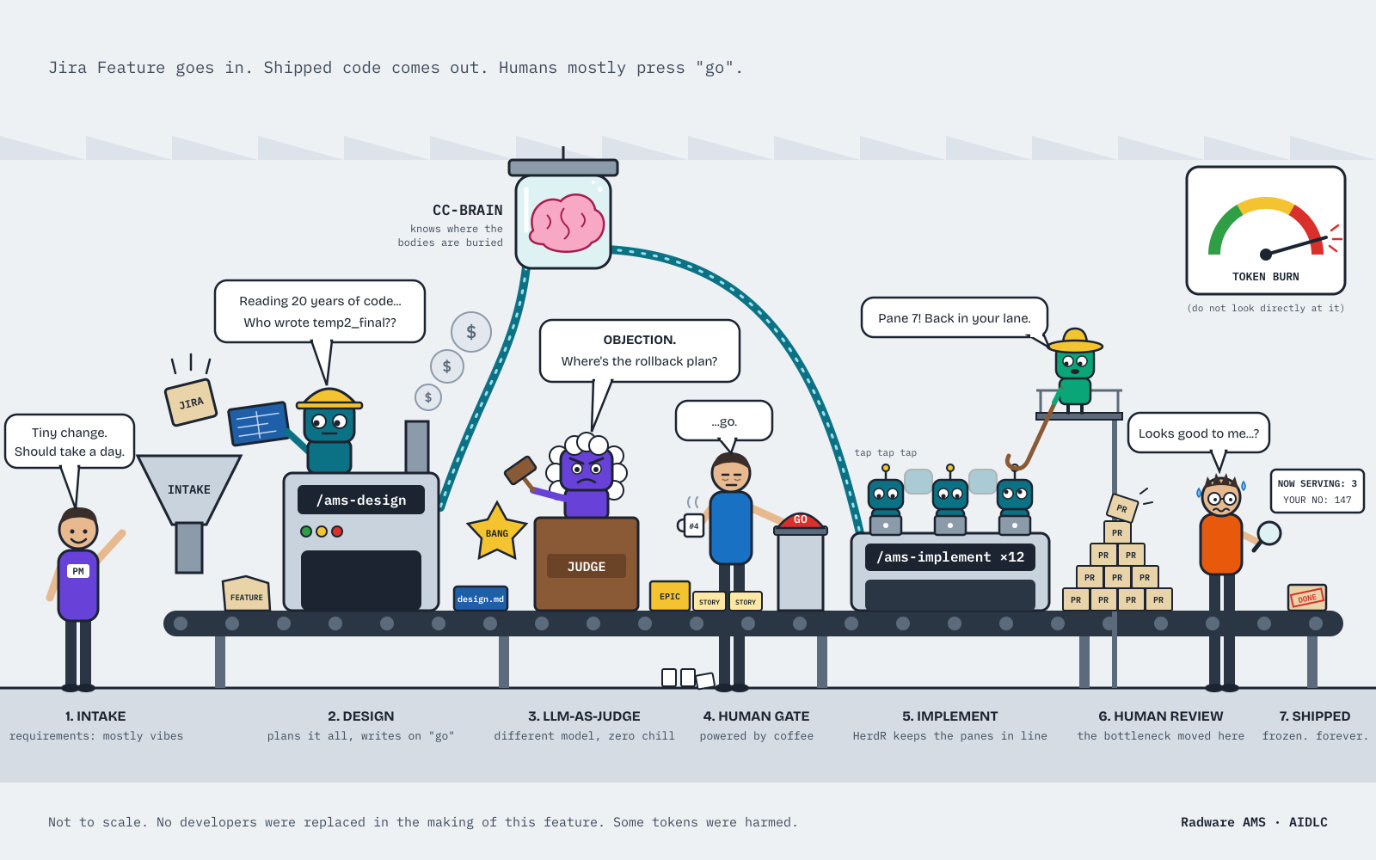
a. Think at the group level
First, a bit of context on the group’s workflow, which is fairly standard. A PM writes a Jira Feature. That Feature gets broken into Epics, and each Epic gets broken into User Stories. A user story is the smallest piece of work for one developer. When all the stories under an Epic are done, QA tests the whole Epic. A Feature is usually delivered by one team, sometimes a few. (I’m skipping dev and QA subtasks to keep this simple.)
Before we had any AI framework, it was just developers with GitHub Copilot in the IDE. With the right context (more on that later), a coding agent can handle a single user story pretty easily. The problem was everything around the story. Even if we had a design doc, the agent working on story A didn’t really know what was being built in story B under the same Epic. Every story lived in its own bubble.
So we realized we needed an orchestration layer that sees the whole picture, starting at the feature level, and features can sometimes be big (as much as XXX man days of full-stack development in the pre-AI era). It had to understand both what is being delivered (the Feature and Epic view) and who is delivering it (the team view), and plan the work top-down: Feature → Epics → User Stories.
b. Fit into how we already work
We run SAFe (Scaled Agile Framework), so we ship every quarter. Before each quarter starts, we have PI Planning (PI = Program Increment). That’s the day we commit to a plan for the quarter, break it into a detailed plan across 6 sprints, and then go deliver. We also provide HL estimates before that, to give a ballpark of what would be delivered in a quarter.
We didn’t want a new process. We wanted AI to plug into the one we already have and support it all the way from high-level planning to delivery, with AI producing every artifact along the way. The PM still writes the Jira Feature, but from there the AI framework generates the Epics, User Stories, design docs and code. It’s the same flow we’ve always had, with AI doing the heavy lifting.
This also solved estimations. We need rough estimates early to commit to the quarterly plan, and detailed ones later for PI planning and then sprint planning. Since the AI is already doing the Feature → Epic → Story breakdown, it can give us both, always criticized by a feature owner, accountable for delivery.
c. Simplicity of use
We based our framework mainly on Agent-Skills (great work by Addy Osmani), but with massive changes to simplify the workflow and adapt it to our needs. GSD and SuperPowers were also an inspiration.
We support both Claude Code and GitHub Copilot CLI. Slash commands invoke all actions. /ams-[action] is the naming convention.
The basic flow looks like this:
The first interaction is a design agent which gets just a Jira feature ID. The interface is simply a slash command: /ams-design <Jira feature ID>. Then the framework gets the feature content via Jira MCP and the model (Opus or similar for the design phase) goes through a design process with the user. There is always a fresh context look with a second model session that acts as an advisor. Once the HL design is approved by a human, a design document is created in MD format and stored in a Bitbucket repo (AMS Docs) for agent lookup and updates. Then Jira epics and user stories are created, populated in Jira with implementation details, and from that point, each developer can invoke the /ams-implement agent (using Sonnet or similar for coding) for a given Jira user story. All this aligns with the intent and spec approach recently suggested by Anthropic for agentic SDLC.
A note about the design agent. We’ve found that this process can take a while, sometimes with many iterations between the design agent and the user, especially for complicated and big features. However, the time invested is worth it, as the output is good and accurate (of course, good context is key), and the following implementation effort is reduced substantially. With complicated features, human interaction seems to be always required, and we still don’t see a design agent producing a perfect design.
The flow chart below describes the technical flow of the design and implement phases. It shows the agentic process implemented with commands, skills, hooks, personas and a whole bunch of other .md instruction files, but from a user’s perspective, the interface is quite simple.
A few more technical details on the design flow
The agents:
- 📐 Architect (agents/architect.md): the lead. It reasons, decides and writes.
- 🔎 radware-expert (agents/radware-expert.md): the researcher it sends out to read.
- ⚖️ Judge: a subagent started with no memory of the design work, so its critique is independent.
- 🛠 Engineer (agents/engineer.md): takes over once the design is done.
The skills (rulebooks):
- ams-docs-radware: how to write design files.
- jira-context-radware: how to read Jira.
- jira-backlog-radware: how to write Jira.
- product-knowledge-radware: how to understand the product.
- cc-brain-radware: how to read code-index results.
The MCPs (connections to outside systems):
- Atlassian: Jira.
- cc-brain: an index of the code across all the product repos.
The call. A human types /ams-design [Jira feature ID]. The Architect agent starts up: it reads commands/ams-design.md and its own persona file, then opens the main rulebook, ams-docs-radware. Following it, the Architect syncs the ams-docs repo and checks that no guard forbids editing.
Sending the researcher. The Architect doesn’t read the raw data itself. It sends the radware-expert with one instruction: “Bring me a brief, not the raw data.” The researcher reads three sources:
- jira-context-radware, then the Atlassian MCP: the issue is a Feature about caching SocX reports.
- cc-brain-radware, then the cc-brain MCP (service_context):
- product-knowledge-radware: the product overview confirms the service map.
It returns one page: the issue, the services involved, file:line anchors, which repos are on disk, and what’s still unknown.
Framing and the outline. Using the brief, the Architect restates the problem and the developer confirms it. It then proposes two Epics and five Stories, with sizes and order, and waits. On “go”, ams-docs-radware guides it as it writes the design doc and the empty Story files, editing only inside its own markers.
The Judge. At challenge, the Architect starts the Judge with no shared memory, so it can’t simply agree with the Architect. The Judge reads every design file and checks each claim against the cc-brain MCP (search_code, impact_analysis). It finds that the design names a Redis cluster that doesn’t exist, which is a blocker. The Architect brings each finding to the developer one at a time. The developer accepts the fix, and the Architect writes it.
Reserving Jira. The Architect opens the second rulebook, jira-backlog-radware, and its reference placeholders.md. Through the Atlassian MCP it creates two placeholder Epics, so the team’s planning has keys to point to.
Designing each Story. For each story next, the Architect works on its own. It asks cc-brain where the code lives (search_code) and who calls it (find_callers), then reads those files directly. It drafts the full Story (approach, risks, Sub-tasks, definition of done), shows it once, and writes it when the developer approves.
Building the tree. When a human marks the design ready, the Architect follows jira-backlog-radware and its reference materialize.md. It asks the Atlassian MCP for every existing child of the Feature, in any status. It recognises its own placeholders by slug, finds an old cancelled Story worth reusing, and proposes the full tree: Epics → Stories → Sub-tasks. On “go”, it builds the tree, marking each issue ams:managed so a future run won’t duplicate it. It then hands off: “Engineer, /ams-implement is yours.”
Closing. After the work ships, the Architect returns to close the design. The Atlassian MCP confirms every issue is closed, git confirms every merge, and cc-brain shows one endpoint was renamed during implementation. Following ams-docs-radware, it updates the design to match the shipped code and marks it done.
In short: the Architect decides and writes, the subagents read and critique in their own contexts, the skills set the rules, and the MCPs reach Jira and the code. None of them writes anything until the human says “go”.
The /commands — Interactions with the framework
We kept very basic commands for the development cycle and a few special commands to handle support cases.
Developer experience
We debated whether to build a framework with a UI that runs in the browser (like most commercial solutions) or to keep everything in the CLI. We preferred the native CLI interface for two reasons. We wanted our team to keep working directly in the coding tools’ interface and enjoy all the benefits of the coding tool directly. Claude and Copilot ship new features all the time, and we found that keeping that interface simple and native to use is the best way to enjoy it. We could have used the SDK, but coding tools like Claude Code and GitHub Copilot usually get updates before everything else. The other big reason is the harness. Claude Code and GitHub CLI provide very powerful coding harnesses, and although the SDK might provide it, we wanted to keep the first-hand experience.
Those who like more UI can use the Claude Code/Copilot desktop apps, which provide the same functionality, although sometimes a bit late on new features. We do use the browser for dashboards, Figma and of course Jira itself. We still need to maintain the development cycle for delivery cadences, QA team integrations and overall process management.
More on productivity
Claude Code in the terminal does not provide a good view if you’re working with many sessions in parallel. One of our developers wanted to give himself a clear view of his own sessions, since parallel work is the key productivity booster in agentic development. He started building a dashboard in the browser, but then HerdR was released.
HerdR is a workspace manager for AI coding agents. Each session gets its own terminal pane. Panes are grouped into tabs, and tabs into workspaces, usually one workspace per project. You can run several sessions side by side.
It shows each agent’s status. HerdR reads every pane and marks each agent as working, blocked or idle, so you can see which one needs your attention.
What HerdR doesn’t know is what an agent is working on. It can tell you an agent is busy, but not which ticket it’s on, what stage the work is at, or what should happen next.
How AMS Buddy fits in
AMS Buddy is a HerdR plugin that fills that gap for Radware AMS work. It adds a small dashboard on the right of each tab showing the AMS state of the agent you’re focused on, like:
- The phase (investigate, design, implement, validate, review, done), the work item and Jira ticket, the current step and next action and the PR status
This gave our developers a productive environment to manage multiple agentic sessions.
The context engine
There’s a lot of text in this part, but this is a pivotal section.
From the get-go, it was clear that the coding tool needed rich context. Our code base is a mix: one old legacy JBoss repo, 30–40 Spring Boot microservices on various Spring Boot versions, Node.js, React, GWT, Python and Bash scripts. Hundreds of thousands of lines of code written over 20 years. We learned quickly that features that span a few microservices are hard to understand in one context window session (however large it may be), and that we needed a brain to help the coding agent.
We started with instruction files for each repo, and other top-level .md files describing the relations between repos, but that was not enough. We researched a few open-source solutions like repowise and graphify, but realized they were not good enough for us, so we developed our own context engine, called CC-Brain
CC-Brain is how the coding agent stops guessing its way around building features for Cyber Controller. It’s the agent’s technical map of Cyber Controller. Think of our product as ~40 repos that talk to each other through Java, queues, REST, Docker, nginx, the WebUI and scripts. CC-Brain is the map plus a search box, handed to any coding agent over MCP.
The two basic parts of CC-Brain
CC-Brain is built from two storage layers. They answer different kinds of questions, and an MCP server exposes both to AI agents.
1. The knowledge graph (the “structure brain”)
What it is: a map of how everything in the Cyber Controller workspace connects. Entities are dots (nodes) and relationships are lines (edges). Right now it’s about 140K nodes and 670K edges across 32 repos.
What’s in it: code and infrastructure only.
- Code: Java classes, interfaces, enums and methods, Maven modules and services, React UI components, and Python and shell scripts.
- Messaging and data: RabbitMQ exchanges and queues, Elasticsearch indices, DB tables, Redis keys, and config keys.
- Infra: Docker services and volumes, nginx routes, REST endpoints, and IRP elements.
The edges describe how these entities relate. For example, a method calls another method, a class listens on a queue, a service writes to an ES index, an nginx route routes to a Docker service, and a module depends on another module. There are 28 edge types in total.
How it’s built: thirteen extractors read the source in a fixed order: POM files, Spring annotations, the Java code itself, compose files, nginx config, the RabbitMQ definitions file, and so on. Each one adds its piece. Every node gets a fixed ID, so when two extractors find the same thing they merge it into one node instead of creating duplicates.
How much to trust each link: every edge is tagged as either resolved (read directly and exactly from source) or inferred (a best-guess match). Tools use this tag to tell you how sure they are.
What it’s good for: exact, yes-or-no structural questions.
- Who calls this class?
- What breaks if I change this queue or table?
- How does data flow from the UI down to Elasticsearch?
- Which two services secretly share the same DB table?
Where it lives: today it’s a single in-memory NetworkX graph saved to one file (about 84MB). It’s simple and local, but only one process at a time can really use it. The plan is to move to Neo4j later for concurrent access and heavier graph analysis. All tools go through a small interface, so that swap shouldn’t touch any tool code.
2. The vector store (the “meaning brain”)
What it is: a searchable index of text chunks. Each chunk is turned into an embedding, a vector that captures its meaning, so you can search by what something is about instead of exact words.
What’s in it: two collections.
- Code chunks (about 154K): Java is cut up smartly, with one chunk for each class header and one for each method (including its Javadoc). Properties files are grouped into small sets of related keys. YAML, UI files and shell scripts use a sliding window.
- Doc chunks (about 520): the team’s copilot-instructions.md and AGENTS.md files, split by heading. Each chunk is tagged with its doc type, so a tool can ask for “only the agent instructions for this service.”
How it’s built: the chunker splits the files, an embedder turns each chunk into a vector, and the chunks go into ChromaDB. The embedder can be a local model, Voyage (a code-tuned model) or OpenAI, depending on config.
What it’s good for: fuzzy, natural-language questions.
- How does attack reporting work?
- Where do we handle device polling?
- What do this service’s docs say about change risk?
One accuracy detail: every search pulls a wide pool of candidates and then keeps only the top results. Asking the index for just a few results directly tends to miss good matches.
Where it lives: today it’s ChromaDB, stored as a local file-based database on one machine. A Qdrant option is partly built, and switching will be a one-line config change. The main reason to switch is that ChromaDB has trouble with concurrent access, and a server-based store is needed to serve many developers at once.
How they work together
Most tools use just one of the two. For example, search_code uses the vector store, while impact_analysis and trace_pipeline use the graph. The clearest example of both working together is service_context: it pulls the team’s written guidance from the vector store and the hard facts (endpoints, queues, tables, dependencies) from the graph, then combines them into one briefing for the agent before it starts editing.
The actions CC-Brain provides
Below are the agent-facing actions, grouped by which part of CC-Brain they use. Nine are live on the production server (the “core” profile). The rest are built, but only people can use them, through the dashboard.
Vector store actions
- search_code does a meaning-based search across code and docs. For Java hits it returns a pointer (file, lines, symbol) and points the agent to view for the full source.
Knowledge graph actions
- find_callers / find_callees show who uses a class or method, or what it uses. That includes injections, subclasses, deeper callers, and callers in other services over REST. Each list tells you how much it returned out of the true total.
- impact_analysis answers “what breaks if I change X?” for a class, queue, ES index, DB table, config key, Redis key, endpoint, Docker service and more. It lists the affected services and gives a low, medium or high risk level.
- git_diff_impact runs the same blast-radius check on a git diff, so you can use it before opening a PR. If the diff has no Java code, it says “unknown” rather than “low”.
- trace_pipeline finds the path from A to B across services, for example UI → REST → queue → consumer → ES. If it can’t find a full path, it shows where the chain breaks.
Both combined
- service_context gives a briefing on a service before you edit it: the team’s agent instructions (from the vector store) plus its endpoints, queues, tables, Redis keys, routes, volumes and dependencies (from the graph).
Direct source access (neither store)
- search_text is an exact text or regex search over the source, so the agent can copy real strings instead of recalling them. It always reports the true number of matches.
- view reads a range of lines from a file. It has smart repo and path matching, and it can’t read anything outside the workspace.
Registered but not served to agents (dashboard only)
- coverage_for shows how much of a repo’s graph is exact versus a best guess.
- service_topology shows how services connect, for one service or the whole platform.
- find_dead_code finds code nothing seems to use. It only calls code dead when the evidence is solid.
- trace_deployment / list_docker_services show a Docker service’s owner, dependencies, volumes and incoming nginx routes.
Adding JEV to the mix
JEV is a new model from TypeSafe AI that is built to make software decisions rather than generate text. You give it data and a predefined question, and it returns a typed choice or score with probabilities and confidence instead of writing an answer token by token. TypeSafe reports responses in 70–500ms, and the suggested pattern is to put Jev in front of your existing LLM so the expensive model only runs when it’s actually needed.
The /ams-design phase is full of small decisions with fixed answers (which services, S/M/L, must-change vs verify, match/drift). Jev answers these as typed choices with a probability, fast and cheap. That leaves the big LLM free to write the design, while CC-Brain’s graph stays the source of truth.
Examples:
- Impact triage while composing a Story: Jev cuts hundreds of impacted nodes down to must-change vs verify, and checks the flag-gated paths. The result is sharper risks and less context to send.
- Reconciling shipped vs designed: Jev compares what each Story planned to touch with what the merge actually touched, and returns match, drift, or not proven.
- Outline sizing: Jev estimates S/M/L from structural signals, calibrated on past Stories.
- Grounding and scoping: Jev scores which services are in scope, so code exploration starts in the right place.
- Code exploration and pre-judge check: Jev reranks search hits and runs a quick rubric check before the LLM-as-judge.
Metrics
We maintain two kinds of KPIs, each on its own dashboard:
1. AI framework usability and efficiency — are developers actually using it, and is it doing a good job?
This one is pretty simple: the framework sends events to a Grafana dashboard, and we slice and dice them to see how it’s being used. Let’s be honest, building a cool framework doesn’t mean developers will use it. Adoption has to be earned, so a tight feedback loop is super important. It’s how we track the KPI that matters most: how well the framework works and how good the code it produces is. Our favorite signal is the number of back-and-forth rounds with the user until a human approves the output, whether that’s a design document, a batch of generated Jira user stories or code that’s ready for a PR. Fewer rounds usually means the context and skills are doing their job. Lots of rounds tells us exactly where to dig in and improve.
We are also working on improving the quality of the framework outputs by feeding the full output of a design/coding session to an LLM, identifying areas for improvement, and feeding that back into CC-Brain.
2. Token consumption (and how to keep it under control)
Tokens cost money, and it’s surprisingly easy to burn through them without noticing. So we built a separate dashboard that tracks token consumption using OTEL data and additional log files generated by Claude/Copilot that give us some extra details. Some groups just use plain Copilot or Claude, so we built this one for the entire R&D group at Radware with a task force from a few R&D groups. We went with OpenObserve to power it. Without going too deep into the weeds, the numbers come from a few places: the /chronicals command in GitHub Copilot, the usage data Claude provides, and some cost-management logic we wrote ourselves. The dashboard also provides our managers a clear picture, from the whole org down to a single team or developer, of where the tokens are going. And we don’t just throw charts at people. Every view comes with simple calls to action and quick wins (like running /clear before starting a new task :) , so cutting consumption is really actionable.
Figma to UI
We also built a Figma-to-UI component, focusing on using AI agents and Figma MCP integrations to automatically convert Figma designs into production-ready frontend code while maintaining alignment with existing design systems and UI frameworks. Although this is just a skill, it’s a pivotal part of the FE stack, so it’s worth mentioning here.
The solution extracts design metadata, components, tokens, layouts, and interaction context from Figma, then uses a coding agent to generate React/UI components, support iterative design changes, and synchronize updates back into the codebase. A key aspect of the architecture is design-system discovery and component reuse, ensuring generated code maps to existing UI components, styling tokens, state-management patterns, and project conventions rather than creating standalone implementations. Initial validation demonstrated successful end-to-end generation of screens from Figma, followed by reapplying design updates such as layout, color, and content changes through automated code regeneration.
AI Support for support
We defined a clear goal. Every customer support case should have an AI-generated RCA and PR ready to merge. As stated above, we built specific commands to handle a support case, and the data it gets is the customer report from Jira and logs, then it’s pretty much the same flow as a bug. However, additional data can help identify the issue: the history of previous cases. We considered using a vector store to hold all support cases data, but that turned out to be hard to maintain. We ended up with OKF to store old support cases, and we see good results so far.
The bottleneck moved
So the PR is the new bottleneck. Agents write code much faster than people can review it, so our next big investment is in this phase, i.e. EVAL.
First, review has to live where developers already work. There are local review agents, with many refined skills for various use cases, and we also have review agent into the Bitbucket PR flow, so its findings show up as regular PR comments with file:line references, right next to the human ones, and not in a separate tool (Tip – Invest on structure and good human readability for generated code, saves lots of human review time).
Second, good evals. We’re building a set of past PRs where we already know what the reviewers found, and what slipped through to QA or to customers, so we can measure what the review agent catches, what it misses and how much noise it adds. A noisy reviewer gets ignored fast. Those numbers are what will get us closer to automated PRs, step by step: low-risk changes first, merged with an agent review and a lighter human check, and a wider scope only when the evals say it’s safe.
Distribution
A framework only helps if it reaches every developer, so distribution got its own tool. Bar Levi Atias built toolkit-ai for org-wide use, as the single channel for shipping all of our AI tooling to every machine and every coding assistant: skills, agents, slash commands, hooks, MCP server configs and plugins. It’s open source and published on npm.
It works like a package manager. Our Bitbucket repos are the sources. The toolkit shallow-clones them and finds resources by file convention (SKILL.md, *.agent.md, *.mcp.json, plugin.json). It then installs each one in the format of each assistant on the machine. Claude Code, Copilot CLI and Codex get real plugin registrations, and Cursor, VS Code and Amp get configs translated into their formats.
Day to day, running toolkit opens a React Ink TUI for browsing, searching and installing from the catalog. toolkit check compares content hashes in the lockfile to show what changed, and toolkit update installs the new versions. Every install also passes a static security scan first, to make sure no dangerous skills are added.
Publishing a new skill is just a merge. Everyone gets it on their next update.
Final note about velocity
Coding velocity has clearly increased substantially (x5–x10). Clearly, ship to production time has not improved at the same rate, although it’s much faster than before. Actual coding is just one part of the SDLC (some say 25%), and we need to address the other steps and optimize them as well. We are on it.
Many thanks to Martin Levinson, Gal Yesuha, Jonathan Wolf, Ido bar and especially Bar Levi Atias for their contribution.