Introduction
When we set out to design AI Agent Classification, the first question was not only what the system should identify, but how to help security teams understand a type of traffic they were not used to seeing.
AI agents are different from traditional crawlers. They do not just read or index content. They can actively navigate workflows, call APIs, extract data, perform actions, and make decisions in real time. This makes their activity harder to interpret, because it can sometimes look like legitimate user behavior.
From a UX perspective, the challenge was to turn this new and complex traffic type into something that helps users quickly understand who is accessing the application, what kind of agent it is, and whether its activity pattern requires further attention.
This blog looks at the design decisions behind the AI Agents view in Bot Manager Analytics, and how we shaped the experience to give security teams clearer visibility without adding unnecessary complexity.
The Challenge
Making Agentic Traffic Understandable
AI agents introduce a new layer of complexity to application security. They can move through workflows, trigger actions, call APIs, and generate requests that appear valid.
For security teams, the problem is not only detecting that automated activity exists. The real challenge is understanding the context behind it.
Users need to answer practical questions quickly:
Which AI agent is accessing the application?
Where does it come from?
How is it classified?
How much activity is it generating?
Is this behavior stable, increasing, or unusual?
When this information is not clearly organized in one place, users need to connect data manually. This increases cognitive load, slows investigation, and makes it harder to decide whether the activity is expected, requires monitoring, or should be investigated further.
The Design Solution
A Dedicated View for AI Agents
To address this challenge, we designed a dedicated AI Agents view inside Bot Manager Analytics.
Instead of presenting AI agents only as part of general bot traffic, we gave them a separate analytics view. This was an important design decision: agentic traffic is not just another bot category. It behaves differently, carries different operational meanings, and requires users to ask different questions.
By separating AI Agents into their own view, we help users understand that this is a distinct traffic type, while keeping it inside the familiar analytics environment they already use.
For Radware, the design goal was not to create a separate AI-only workflow, but to make agentic traffic understandable inside the operational analytics environment security teams already rely on.
Unlike approaches that treat AI-related activity as another generic automation signal, we decided to make agentic traffic visible as a distinct traffic category, while keeping it connected to the broader Bot Manager analytics workflow.
In Figure 1, you can see the dedicated AI Agents view in Bot Manager Analytics. The key point to notice is how the view brings agent identity and traffic behavior into the same workspace, instead of forcing users to interpret them separately.
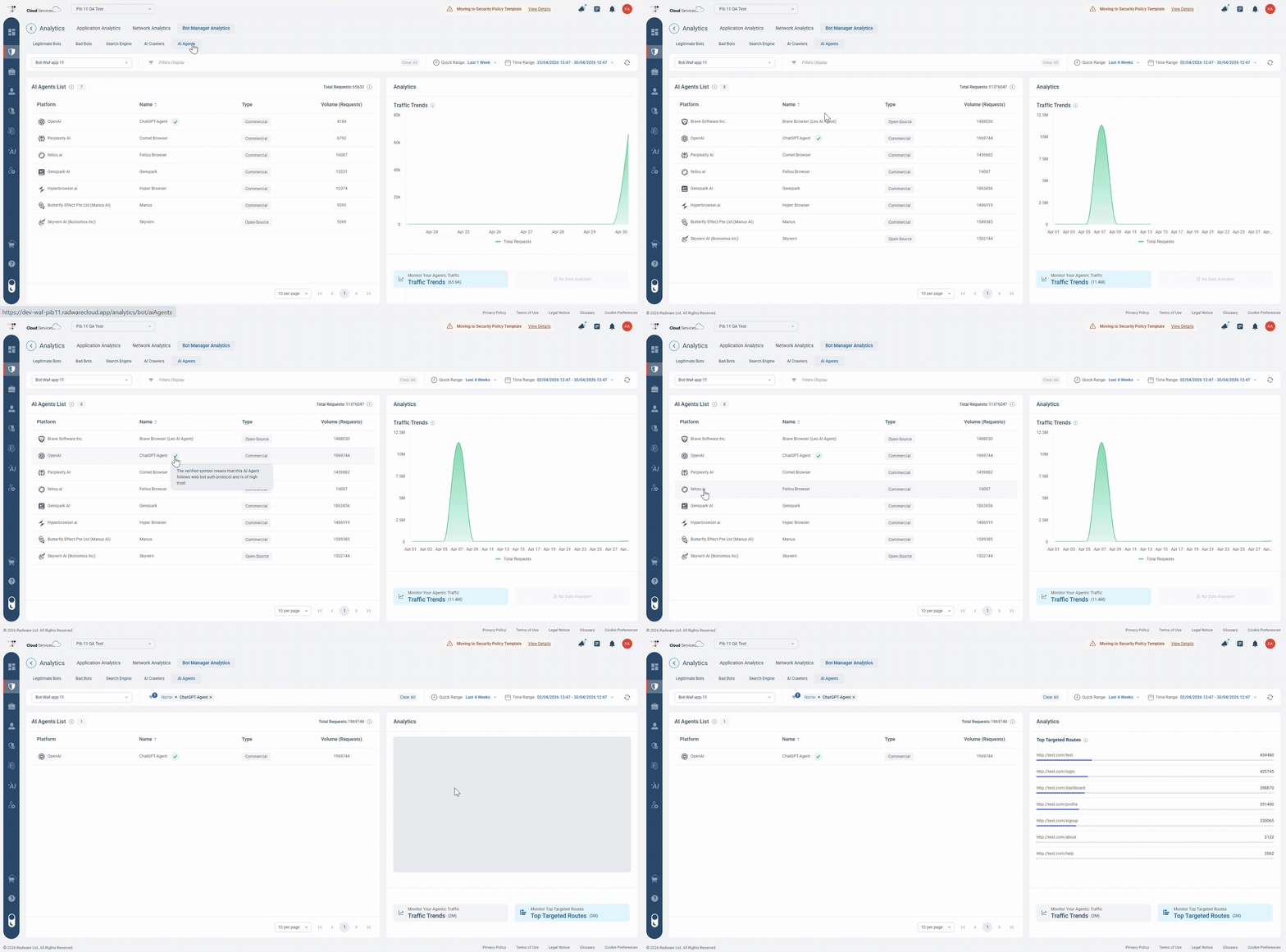
Figure 1: The AI Agents view connects agent identity with behavior over time, helping users understand who is accessing the application and whether the activity requires further attention.
Notice how the AI Agents list and the Traffic Trends chart work together: the list provides fast identification through platform, name, type, and volume, while the chart adds the behavioral context needed for investigation.
What We Chose to Show
Identity Before Detail
One of the key UX decisions was to keep the first layer of information focused.
The AI Agents list presents four core fields: Platform, Name, Type, and Volume. These fields were selected because they help users build an initial understanding before moving into deeper investigation.
Platform helps users understand where the agent comes from.
Name identifies the specific agent.
Types give classification contexts, such as commercial or open source.
Volume helps users understand the scale of the activity.
This hierarchy gives users a fast-starting point. Instead of exposing too much technical detail upfront, the view focuses on the information needed to understand the situation quickly.
How We Chose to Show It
Familiar Patterns for an Unfamiliar Category
Because agentic traffic is still a new concept for many organizations, the experience needed to feel familiar.
The temptation with a new feature is often to introduce a new visual language. In this case, we made the opposite decision. We used familiar analytics patterns: a dedicated tab, a structured table, time-range controls, filters, and traffic trend visualization.
This allows users to explore a new type of traffic without learning a completely new workflow.
We also added Traffic Trends to provide behavioral context. Volume alone shows how much activity exists, but the trend view helps users understand whether the activity is stable, increasing, or showing a pattern that may require attention.
Together, the list and trend view support a natural investigation flow: identify the agent, understand its type, review its activity volume, and evaluate how that activity changes over time.
What We Chose Not to Do
Visibility Before Action
Another important design decision was not to push users toward immediate action.
In security products, it can be tempting to connect every insight directly to an action. But with a new and evolving traffic category, users first need confidence in what they are seeing.
The AI Agents view is designed to support understanding before action. It gives users the context they need to continue the investigation, monitor behavior, and support future policy decisions.
This restraint is part of the UX value. The experience does not assume that every detected AI agent is a threat, or that every spike requires an immediate response. Instead, it helps users make more informed decisions based on a clear context.
Summary
AI Agent Classification helps security teams gain visibility into a new and evolving type of application traffic.
By bringing agent identity, classification, request volume, and traffic trends into one dedicated view, the experience reduces uncertainty and gives users a clearer starting point for investigation and decision-making.
As AI agents become more active across enterprise applications, visibility becomes the first step toward control. From a UX perspective, the value of this feature is not only in showing more data, but in deciding what users need to understand first.
The hardest part of designing a new traffic category is not deciding how much data to show. It is deciding what users need to understand before the data can become useful.