The agentic economy is changing how organizations think about application traffic. Applications are now accessed not only by people and familiar bots, but also by AI crawlers that scan content for model training, indexing, AI-powered search, and real-time retrieval.
This traffic can be legitimate and valuable, but it can also create unplanned infrastructure and egress costs, expose proprietary content to model training without explicit permission or attribution, and increase privacy and regulatory-compliance risks. For security teams, the challenge is no longer simply identifying bots. Organizations need to understand which AI crawler is accessing their applications, the purpose of that access, and whether the appropriate response is to allow, block, or limit its activity.
In this blog, we introduce AI Crawler Identification and Granular Control, a new capability that gives customers dedicated visibility, analytics, and policy control over AI crawler traffic. Customers can identify individual crawlers, understand their classification and traffic volume, and apply an Allow, Block, or Rate Limit policy from a dedicated AI Crawlers view.
The Challenge: AI Traffic Is No Longer Just Another Bot Category
The rise of AI models and autonomous systems is changing application traffic patterns. AI crawlers such as GPTBot, ClaudeBot, and PerplexityBot serve different purposes, each requiring a different business decision. Training crawlers raise intellectual property concerns, real-time retrieval affects brand visibility, and AI search crawlers may support traffic acquisition, so a single Allow or Block decision is insufficient.
The right decision depends on the organization's business priorities. A publisher protecting premium content may block training crawlers to prevent unauthorized use, while a retailer seeking visibility in AI-powered search may allow crawlers that help its products reach potential customers. These different needs make it essential to understand each crawler's purpose and business impact before deciding whether to Allow, Block, or Rate Limit its activity.
The Path to the Solution: From Visibility to Graduated Control
The design challenge was to help security teams quickly understand who is accessing their applications, why, and what response is appropriate. Customer feedback showed that a single bot list lacked the necessary context, while a binary Allow or Block choice could not reflect each crawler's different business value and security risk.
Blocking a crawler that also drives referral traffic is both a security and business decision. We therefore introduced Rate Limit alongside Allow and Block, giving teams greater control without fully denying access.
The Solution: A Dedicated AI Crawlers Area in Bot Manager Analytics
The new capability adds a dedicated AI Crawlers view within Bot Manager Analytics, organized around four questions: Who is accessing the application, why, at what scale, and under which policy? The family name identifies the crawler operator, not its trustworthiness; classification shows its purpose, request volume indicates its impact, and the configured action shows how the traffic is handled.
By bringing this context and policy controls into one view, teams can identify significant crawlers, assess their activity, and apply Allow, Block, or Rate Limit without leaving the dashboard. Previously, identifying a crawler and changing how its traffic was handled meant moving between the bot list, analytics reports, and policy configuration. These actions now take place in the AI Crawlers view, supporting decisions around business exposure, content protection, and traffic control from a single screen.
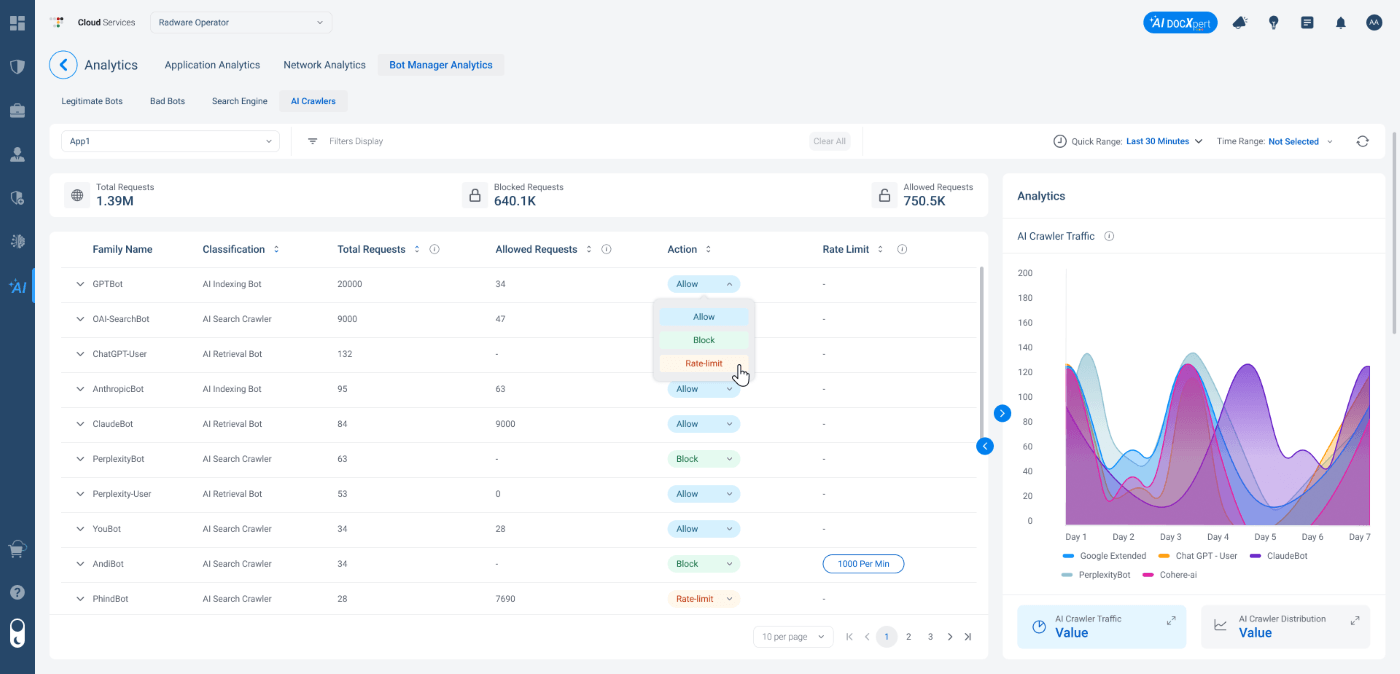
Main AI Crawlers Screen: Crawler identity, classification, traffic volume, policy controls, and traffic distribution are brought together in one dashboard.
Analytics: A Stronger Foundation for Decisions
The analytics layer turns AI crawler data into actionable insight by showing traffic trends and distribution in one place. For example, if a crawler's request volume triples within a week, teams can quickly identify the change on the timeline, investigate its impact, and apply Rate Limit before it affects origin performance.
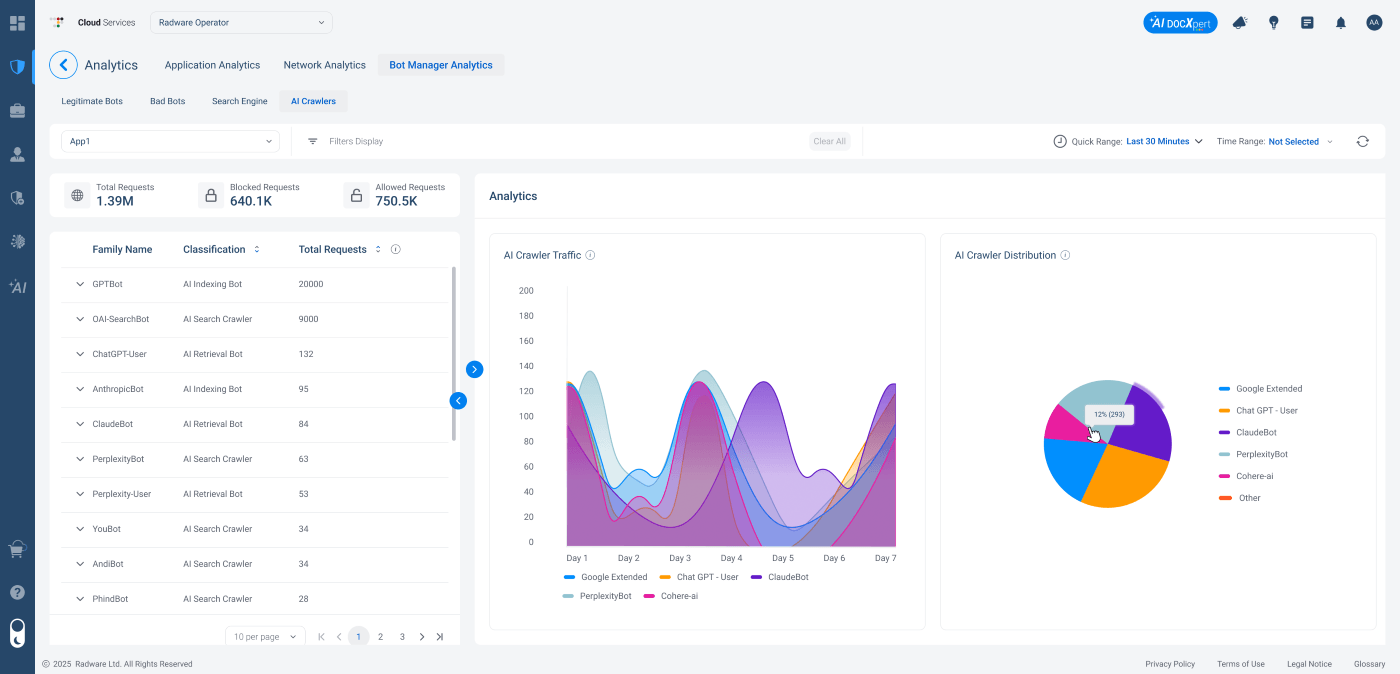
Rate Limit Configuration: Teams can control crawler activity without fully blocking access.
Managing AI Traffic with Confidence
As AI crawlers become an integral part of application traffic, organizations can move from limited visibility to clear ownership and control.
AI traffic becomes a policy domain they can actively manage and confidently explain to legal, finance, and marketing stakeholders. To get started, open the AI Crawlers view in Bot Manager Analytics to review detected crawlers, traffic volumes, and current policies.