Radware’s mitigation is known for being fast and fully automated, requiring no operator intervention. While our touchless mitigation is widely recognized for its strong performance across the industry, some highly sophisticated attacks may still require SOC attention.
Even with our experienced SOC teams and expert tools already excelling in Time to Resolution (TTR), we identified an opportunity to push it even further with AI SOC Xpert.
This blog introduces AI SOC Xpert - an AI-based assistant that becomes activated during ongoing attacks. We’ll explore how we designed an interface that provides real-time attack analysis and recommendations without losing operator control, and how we built the experience to support fast, high-confidence decisions during high-stress scenarios.
The Challenge
Optimize Attack Mitigation and TTM in Edge Cases Without Losing User Control
In most cases, our security teams respond to ongoing DDoS/Bot attacks quickly and effectively. However, in the rare cases where our automated system will not block the attack "hand-free" - the SOC will have to step in and maintain:
- Reduce time to mitigate
- Reduce decision-making time
- Optimizing mitigation accuracy
Our primary goal was to support these improvements without removing control from the operator.
The Design Solution
Real-Time AI Analysis with Human Control
AI SOC Xpert is a real-time assistant that is triggered only during attacks. It is designed to deliver:
- Live detailed attack analysis - A clear and easy-to-scan interface for quick attack research.
- Real-time traffic filtering AI recommendations - easy to filter, prioritize and apply.
- A support layer that empowers human decision-making without replacing it - AI recommendations are applied only by the user, soon we will also provide “Auto-apply” mode.
Designed for Clarity During Critical Moments
During an ongoing attack, SOC operators don’t just need recommendations - they need clarity, confidence, and control over what is happening in their environment.
To address this, we built a structured recommendation lifecycle that provides full visibility into the state of every AI-driven action - from suggestion to activation, expiration, or failure.
Instead of forcing users to track changes manually or guess what is currently enforced, the system makes the operational status of each recommendation immediately clear. This transparent state model reduces cognitive load during high-stress scenarios, prevents configuration uncertainty, and enables operators to act quickly while fully understanding the impact of their decisions.
To further support confident decision-making, we embedded contextual explanations directly into the workflow. This ensures that users always understand why a recommendation exists and what it does -without overwhelming the interface or disrupting their focus during critical moments.
Enabling Confident Decision-Making During Attacks
- To keep users in full control, we made it easy to undo changes at any time.
Users can simply unselect previously chosen recommendations and click Apply to remove them from the active configuration.
- Dedicated AI chat - to build trust and control in our AI SOC Xpert analysis and recommendations, we added a dedicated AI chat window for each attack. The user can ask real-time questions and receive contextual, attack-specific answers like:
“Why did you recommend this traffic filter?” or
“What analysis led to this suggestion?”
The AI only answers questions about the current attack, giving users focused, relevant explanations based on the AI attack analysis. This helps build trust in both the recommendations and the tool itself.
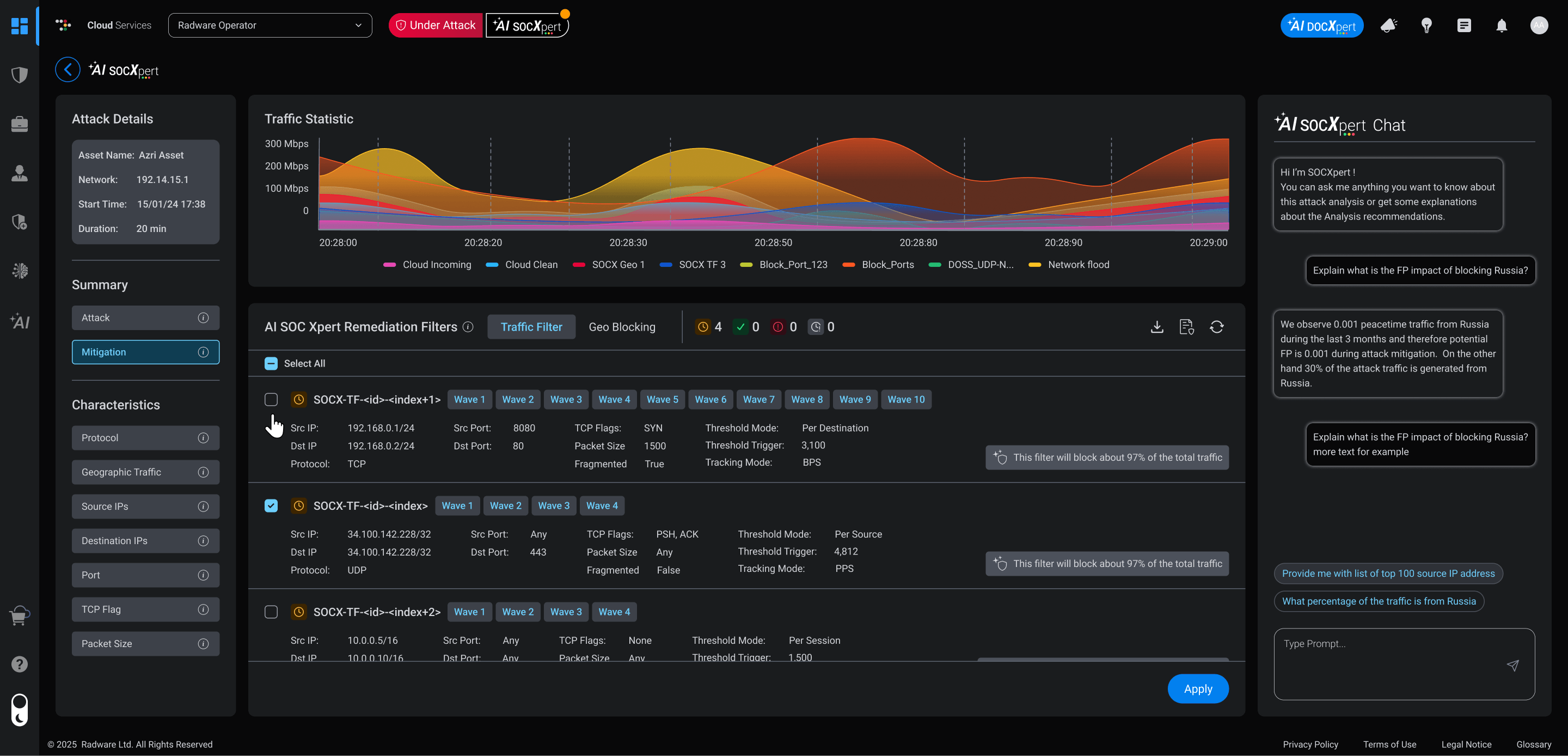
Attack Vectors Evolving? Your Protection Adapts
While an attack is ongoing, the AI keeps analyzing. It may find new problems or create additional recommendations after the first analysis is generated.
Here's how we made this simple for our customers:
- A refresh button with clear indication enabled when new recommendations are available – so the user won't miss important recommendations and also feels in control. The manual refresh prevents interruptions while they're configuring other settings.
- Users can apply or revert any recommendation with just one click.
- Everything is designed for speed so users can respond immediately with confidence.
To provide full real-time transparency in a single place, we added a quick-access shortcut from the SOC Xpert page directly to the relevant Security Policy. During an ongoing attack, this shortcut allows users to open the Security Policy directly from SOC Xpert and view the entire protection configuration in one consolidated view - including both AI-generated remediation filters and existing manual rules.
The policy view clearly differentiates between temporary AI-generated rules during the ongoing attack and persistent policy rules, giving operators a complete and accurate picture of their active protections during an attack. By presenting everything in a single, structured view, it enables faster decisions and eliminates the need to switch between screens or compare information from multiple sources.
Summary
AI SOC Xpert was built with a clear purpose:
To enhance real-time decisions during ongoing attacks - without introducing complexity or removing human control.
We created a solution that offers contextual, actionable recommendations during ongoing attacks, supports transparency and clarity in the UI, and helps operators perform better in high-pressure scenarios.
By combining AI intelligence with human expertise, security teams are better equipped to respond faster, smarter, and with full confidence - knowing they're always in control of their systems.