Taking Control of Your Application Security
Security teams often need to update protections, validate changes, and roll those updates out across multiple applications without disrupting legitimate traffic. We have seen customers struggle with this process, especially when changes need to be tested before production, applied consistently across environments, and rolled back quickly if an issue appears.
For teams managing multiple applications, even small configuration changes can become operationally risky. A single update may need to be tested in one environment, promoted to production, monitored for false positives, and rolled back quickly if it affects live traffic. Without a structured workflow, that process becomes manual, slow, and error-prone.
Security Policy was designed to solve this operational challenge. It gives teams a structured way to test policy changes safely, promote validated configurations to production, track recent versions, refine protections over time, and apply updates consistently across multiple applications through a single workflow.
In many environments, these stages are handled through separate tools or manual processes. Radware’s Security Policy brings testing, validation, deployment, and management into a single, consistent workflow.
Instead of treating security updates as manual and potentially risky tasks, teams can manage them through a more controlled and repeatable process.
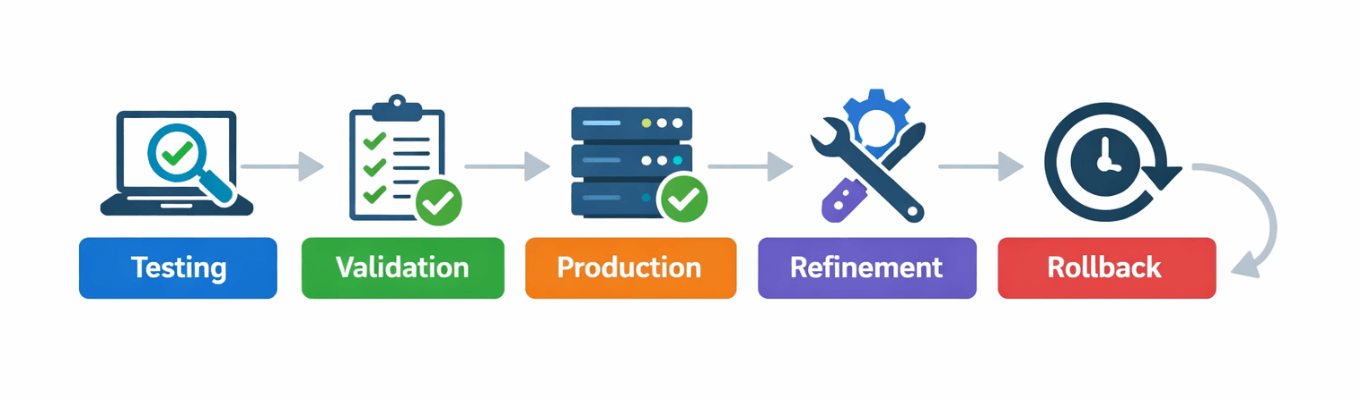
Image 1: Controlled application security workflow
From Testing to Production - Without the Risk
One of the most common operational challenges security teams face is making configuration changes without risking live traffic. Even small updates can create false positives, block legitimate users, or unintentionally weaken protection. In many cases, these issues are only discovered after deployment, when the impact is already visible.
Because of this risk, many teams become overly cautious. Changes are delayed, improvements are slowed down, and known issues are sometimes left unresolved simply to avoid potential disruption.
Security Policy removes this barrier by enabling a safe and structured testing process. Teams can define a policy and apply it to a testing application, where they can validate behavior using real traffic patterns and refine configurations until everything works as expected without impacting production.
In many environments, moving changes to production requires recreating or manually adjusting configurations, increasing the risk of inconsistencies and human error. Radware’s Security Policy removes this gap by allowing the exact same validated policy to be applied directly to production, ensuring full consistency between testing and enforcement.
This approach turns deployment into a controlled process. Teams can move changes into production with confidence, reduce the risk of misconfiguration, and continuously improve security without exposing live applications to unnecessary risk.
Version Control - Full Control Over Every Change
As teams continue tuning protections over time, managing policy changes becomes increasingly complex. Without proper tracking, it is difficult to understand what was modified, when it changed, and how those changes affect current behavior.
Security Policy includes built-in version control, allowing teams to manage up to five recent versions of a policy. Every update is automatically saved, creating a clear history of changes.
This visibility allows teams to compare versions, identify what was changed between updates, and better understand how policies evolve over time, especially when unexpected behavior appears in production.
If a change introduces an issue, teams can immediately roll back to a previous stable version with a single action. There is no need for manual troubleshooting or reconfiguration, and no prolonged impact on applications or users.
This combination of version history, comparison, and instant rollback gives teams confidence to make changes, knowing they always have a safe and fast recovery option.
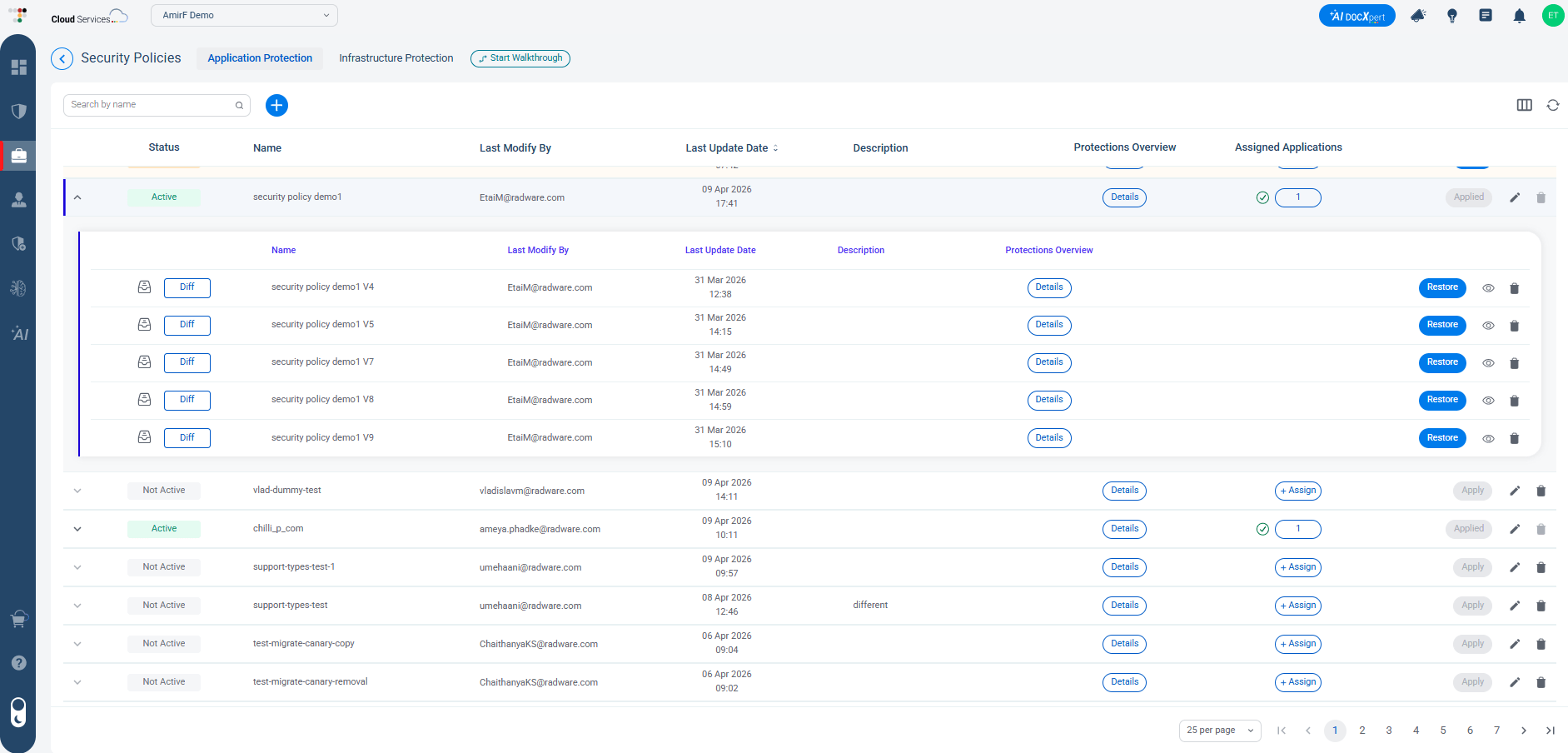
Image 2: Security Policy template showing the last five versions
Continuously Refine Protection Based on Real Traffic
Application security is not static. Traffic patterns shift, new features are introduced, and attack techniques continue to evolve. Policies that were effective yesterday may require adjustments today.
Security Policy enables teams to continuously refine their configurations based on real-time security events and traffic behavior. Instead of reacting to issues on a per-application basis, teams can analyze events, adjust protections, and apply improvements at the policy level.
These refinements are then automatically applied across all applications using the policy, ensuring that improvements are consistent everywhere.
This approach is especially important when dealing with false positives. By refining policies centrally, teams can reduce unnecessary blocking while maintaining strong protection, achieving a better balance between security and user experience.
Apply Changes Once - Across All Applications
Managing security configurations separately for each application often leads to inconsistencies over time. Small changes, exceptions, and local adjustments accumulate, causing applications that should behave similarly to diverge.
Security Policy solves this by allowing a single policy to be applied across multiple applications. Instead of managing configurations individually, teams can define protection once and ensure it is consistently enforced everywhere.
This is one of the areas where Radware’s approach stands out. Rather than forcing teams to coordinate similar security changes across separate application configurations, Radware allows them to manage those changes once through a reusable Security Policy and apply them consistently wherever it is used. By maintaining consistency across applications, organizations can reduce risk, simplify management, and ensure a more predictable security posture across their application environment.
Clear Visibility into Your Protections
Effective control requires clear visibility. Without understanding what protections are in place and how they are applied, managing application security becomes difficult.
Security Policy provides a centralized view of all configurations and protections. Teams can easily review what is defined within each policy, understand where it is applied, and ensure that applications are aligned with the intended security strategy.
This centralized approach simplifies day-to-day management and makes it easier to identify gaps, inconsistencies, or areas that require attention.
With everything managed in one place, teams can make more informed decisions and maintain a higher level of control over their application security.
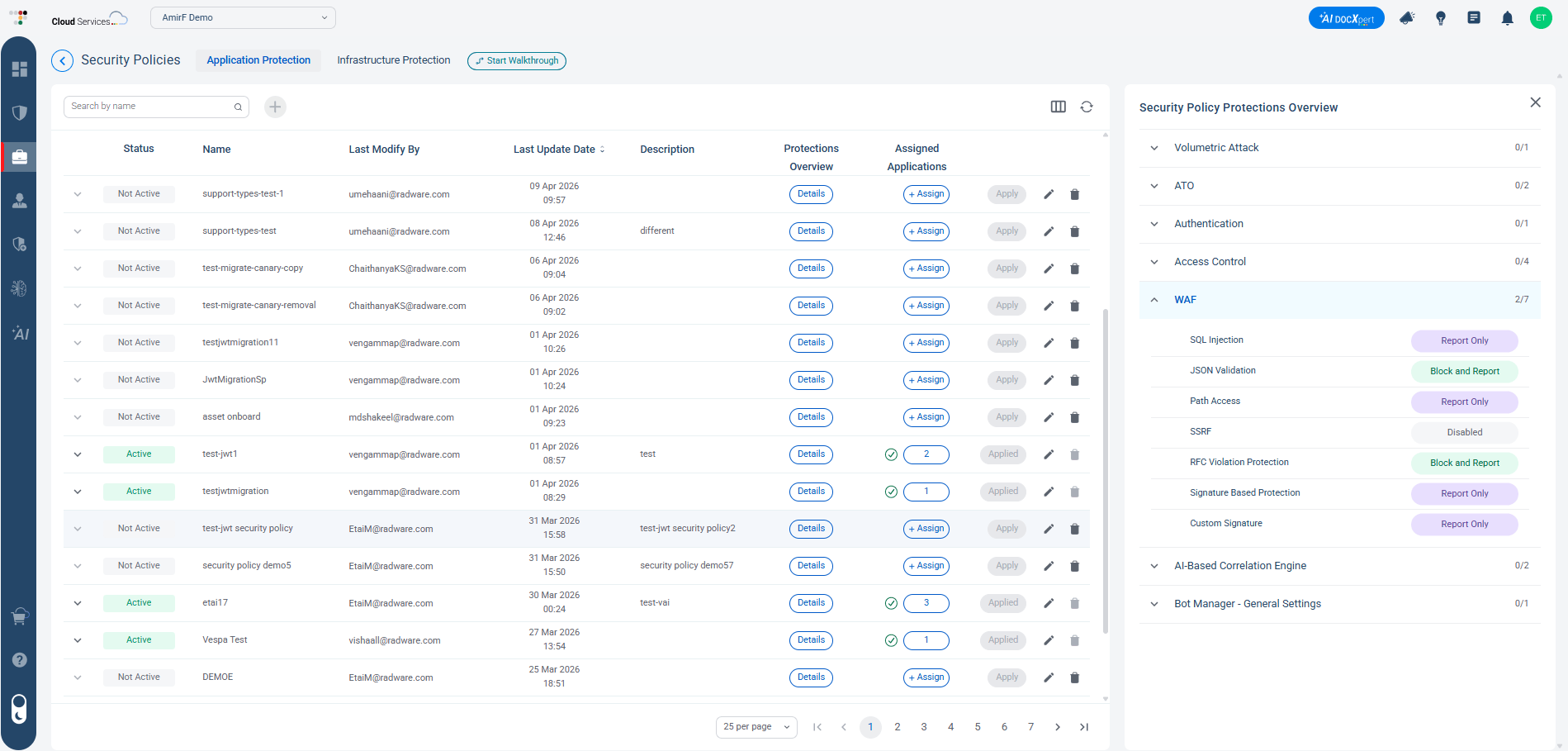
Image 3: Centralized view of security policies across applications
Conclusion
Managing application security effectively is not only about choosing the right protections, but also about controlling how those protections are tested, updated, and maintained over time.
Security Policy provides a structured way for teams to test changes safely, promote validated policies to production, track and roll back updates, continuously refine configurations, and maintain consistency across multiple applications.
What differentiates Radware’s approach is not any single capability on its own, but the way testing, rollout, rollback, and multi-application policy management are brought together in one Security Policy workflow. This allows organizations to reduce risk, improve efficiency, and keep protection consistent as environments continue to evolve.