What is JWT Authentication?
JSON Web Token (JWT) authentication is a stateless, compact, and secure method for transmitting user information between a client and server via a cryptographically signed JSON object. Upon login, the server issues a JWT, which the client includes in the Authorization: Bearer <token> header for subsequent requests, removing the need for server-side session storage.
How JWT authentication works:
- Authentication: The user sends credentials (username/password) to the server.
- Issuance: The server validates credentials and generates a signed JWT containing claims (e.g., user ID, roles) and returns it to the client.
- Request: For future requests, the client sends this token in the Authorization header.
- Verification: The server verifies the token's signature using a secret key or public/private key pair, validating its authenticity without database lookups.
Key benefits of JWT:
- Statelessness: Servers do not need to store session data, allowing for easy scalability and distributed systems.
- Performance: Fast validation as tokens are self-contained, reducing database load.
- Security: Cryptographically signed, ensuring integrity and authenticity.
- Versatility: Suitable for modern APIs, single-page applications (SPAs), and mobile apps.
This is part of a series of articles about API security.
In this article:
1. Authentication
Authentication is the first step in JWT-based systems, where a user submits their credentials, such as a username and password, to a server. The server verifies the credentials against its user database or an external authentication provider. If the credentials are valid, this process confirms the user's identity and lays the groundwork for issuing a JWT, which will represent that identity for subsequent interactions.
This initial authentication maintains the same secure rigor required for any authentication mechanism, including brute force controls and credential management. Security at this stage is critical; weaknesses here can compromise the entire JWT chain. Once authentication is successful, the server creates and signs a token that the client will use for authorization in future requests.
2. Issuance
Once authentication is successful, the server generates a JWT, typically including a header, payload, and signature. The header specifies metadata like the signing algorithm. The payload contains claims: details about the user, such as user ID, roles, or token expiration. The signature is created by signing the header and payload with a secret or a private key, ensuring the token hasn't been tampered with.
The signed JWT is then returned to the client, often in the response body or within an HTTP header. This token serves as proof of authentication for subsequent requests. Because the JWT is self-contained, it can be validated independently by any service with access to the signing key. This enables stateless authentication and smooth scalability across distributed systems.
3. Request
In the request phase, the client includes the JWT in the header (commonly the Authorization header using the Bearer schema) when making requests to protected server endpoints. The server extracts the token from the request and prepares it for verification. This approach means each request carries its own authentication context, eliminating the need for traditional server-side session tracking.
This self-contained approach is especially effective when operating microservices or stateless APIs, as each component can authenticate requests independently. The JWT travels with every request, allowing the server to determine user identity and permissions in a single step, simplifying the exchange and reducing infrastructure complexity.
4. Verification
When the server receives a request with a JWT, it begins by verifying the token’s signature using the correct secret or public key, depending on whether symmetric (e.g., HMAC) or asymmetric (e.g., RSA) signing was used. If the token's signature does not match, the request is rejected. Successful signature verification confirms the token is untampered and issued by a trusted authority.
After signature validation, the server checks the token's claims, such as the expiration time (exp), issuer (iss), and audience (aud). It ensures the token is still valid and applicable to the requested resource. Only when all verifications are successful does the server process the request, granting access according to the user’s permissions encoded within the token.
Creating a JWT
To create a JWT, the server first authenticates the user and then generates a token containing the user's information. Here’s a basic example using Node.js with the jsonwebtoken library in a simple NodeJS express application:
        const express = require("express");
        const jwt = require("jsonwebtoken");

        const app = express();
        app.use(express.json());

        const SECRET_KEY = "your-secret-key"; // use env var in real apps

        // 1) Create JWT token (login)
        app.post("/login", (req, res) => {
          // Demo-only: accept any user payload; no real authentication
          const user = req.body?.user || { id: 123, role: "admin" };

          const token = jwt.sign(
            { userId: user.id, role: user.role },
            SECRET_KEY,
            { expiresIn: "1h" }
          );

          res.json({ token });
        });

        // 2) Middleware to verify token
        function authenticateRequest(req, res, next) {
          const authHeader = req.headers["authorization"];
          const token = authHeader && authHeader.split(" ")[1];

          if (!token) return res.sendStatus(401);

          jwt.verify(token, SECRET_KEY, (err, decoded) => {
            if (err) return res.sendStatus(403);
            req.user = decoded;
            next();
          });
        }

        // Protected route
        app.get("/protected-resource", authenticateRequest, (req, res) => {
          res.json({
            message: "Access granted",
            claims: req.user,
          });
        });

        app.listen(3000, () => {
          console.log("Server running on http://localhost:3000");
        });
This code signs a token using a symmetric secret. The payload includes custom claims (e.g., userId, role) and an expiration time. The resulting token is compact, URL-safe, and can be sent to the client for future authentication.
Store the above code in a file called server.js. We can execute this file using the following command:
node server.js
In production, always store the secret securely and consider using environment variables. For public APIs or when working across services, asymmetric signing (e.g., RSA keys) is often preferred to allow public verification without exposing the private signing key.
Using a JWT
Once the client has a JWT, it includes the token in the Authorization header of future requests. The server then verifies the token before granting access:
  GET /protected-resource HTTP/1.1
  Host: localhost:3000
  Authorization: Bearer <token>
On the server, token verification typically looks like this:
function authenticateRequest(req, res, next) {
const authHeader = req.headers["authorization"];
const token = authHeader && authHeader.split(" ")[1];
if (!token) return res.sendStatus(401);
jwt.verify(token, SECRET_KEY, (err, decoded) => {
if (err) return res.sendStatus(403);
req.user = decoded;
next();
});
}
This middleware function checks for a valid JWT and, if valid, attaches the decoded claims to the request object. E.g., Login API call will use your credentials to create a valid JWT token that can be used with subsequent API calls.
  curl -s -X POST http://localhost:3000/login \
    -H "Content-Type: application/json" \
    -d '{"user":{"id":123,"role":"admin"}}'
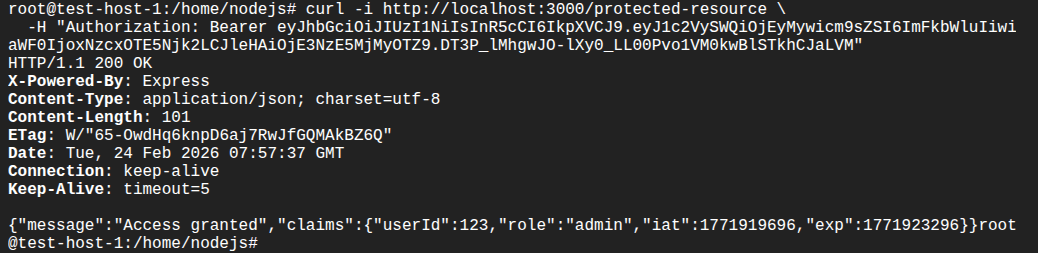
From there, downstream handlers can enforce role-based access or other policies based on user data inside the token. E.g., we use above token to access the protected resource as shown in the following:
  curl -i http://localhost:3000/protected-resource \
    -H "Authorization: Bearer eyJhbGciOiJIUzI1NiIsInR5cCI6IkpXVCJ9.eyJ1c2VySWQiOjEyMywicm9sZSI6ImFkbWluIiwiaWF0IjoxNzcxOTE5Njk2LCJleHAiOjE3NzE5MjMyOTZ9.DT3P_lMhgwJO-lXy0_LL00Pvo1VM0kwBlSTkhCJaLVM"
Jeremie Ohayon
Jeremie Ohayon is a Senior Product Manager at Radware with 20 years of experience in application security and cybersecurity. Jeremie holds a Master's degree in Telecommunications, and has an abiding passion for technology and a deep understanding of the cybersecurity industry. Jeremie thrives on human exchanges and strives for excellence in a multicultural environment to create innovative cybersecurity solutions.
Tips from the Expert:
In my experience, here are tips that can help you better implement JWT authentication securely at scale (beyond the usual “use HTTPS, short exp, refresh tokens”):
Pin the accepted algorithms and key types in code, not config: Enforce a hard allowlist (e.g., only RS256/ES256) and reject tokens whose header doesn’t match exactly what the service expects (alg + typ + kid presence). This prevents “helpful” future config changes from reopening alg-confusion classes of bugs.
Design claim schemas like public APIs (versioned + namespaced): Namespace custom claims (e.g., https://yourco.com/claims/tenant_id) and version them. It prevents collision with future standard claims and keeps multiple issuers/SDKs from silently interpreting the same key differently.
Use “token binding light” with context claims and server checks: Add a constrained context signal (device key hash, session id, or rotating cnf-style value) and validate it server-side against a low-cost store. It’s not full mTLS-bound tokens, but it drastically reduces replay value when a token is stolen.
Make aud service-specific and enforce it per endpoint group: Don’t use one broad audience like api. Use distinct audiences (or resources) per API and sometimes per privilege tier. Many lateral-movement incidents happen because internal services accept the same audience and treat “any valid token” as sufficient.
Prevent privilege drift with “authoritative roles” checks: For high-risk actions (admin, payouts, user management), re-check authorization against an authoritative source or a short-lived “privileged session” token, instead of trusting role claims embedded in a long-lived access token.
Here are some of the common attack vectors associated with JWT authentication:
Token Theft
A primary risk with JWTs is token theft, often resulting from interception during transit or exposure to malicious scripts via cross-site scripting (XSS) vulnerabilities. Once stolen, JWTs provide instant access to whatever resources the token entitles. Unlike traditional sessions that can be invalidated on the server, a JWT is valid until it expires, so the attacker retains access until then.
Protecting tokens in transit is essential: always transmit them over HTTPS and avoid storing them in locations vulnerable to client-side attacks, such as browser localStorage. Mitigate token theft risks by preventing XSS and applying the principle of least privilege when defining token scopes and permissions.
How to mitigate:
To mitigate token theft, use secure transport (HTTPS) and avoid exposing tokens to JavaScript. Prefer HTTP-only, secure cookies for web apps to prevent access from scripts. Implement strong Content Security Policy (CSP) headers to block inline scripts, and use modern frameworks that auto-escape output to minimize XSS risk. Additionally, monitor token usage for anomalies (e.g., changes in IP or user-agent), and consider binding tokens to device identifiers or sessions for further control.
Improper Storage
Storing JWTs improperly on the client increases the risk of compromise. Common browser storage mechanisms (like localStorage or cookies) can be vulnerable to XSS or CSRF attacks. If an attacker injects code or tricks a user into submitting authentication tokens, the tokens can be extracted and abused.
Best practice recommends using HTTP-only, secure cookies (especially for web applications) because they are inaccessible to JavaScript, reducing XSS risk. Alternatively, when storing JWTs in browser storage, ensure that strong content security policies and XSS protections are in place to prevent unauthorized access.
How to mitigate:
Use secure, HTTP-only cookies for storing JWTs in web applications to prevent JavaScript access, which is critical in mitigating XSS risks. For mobile or desktop apps, leverage OS-level secure storage APIs. Never store tokens in localStorage unless you can fully trust the execution environment and have robust XSS mitigations in place. Also, implement CSRF protection mechanisms (like same-site cookie flags and CSRF tokens) if JWTs are stored in cookies and used for browser-based requests.
Lack of Revocation
JWTs are designed to be stateless, and as such, they are not easily revoked. If a token must be invalidated before its expiration (say, when a user logs out, changes credentials, or an account is compromised) there is no built-in mechanism to make this happen server-side. Once issued, the token is valid until it expires, unless elaborate denylisting systems are implemented.
Implementing revocation in JWT systems can be complex and may negate some of the performance benefits. Some systems use short-lived JWTs with refresh tokens and maintain a denylist or token revocation list on the server for high-security environments, trading off statelessness for faster response to potential breaches.
How to mitigate:
Use short-lived access tokens with refresh tokens to minimize the lifespan of any compromised token. Maintain a revocation list or denylist to track and reject tokens flagged as invalid, particularly after logout, password changes, or suspicious activity. Use token identifiers (jti claims) to index tokens for revocation tracking. For sensitive operations, require re-authentication or use one-time tokens tied to a privileged session that can be revoked independently.
Algorithm Misconfiguration
JWT libraries support multiple algorithms for signing tokens, including symmetric (HS256) and asymmetric (RS256) algorithms. If a system incorrectly accepts “alg: none” tokens or mismatches expected and actual algorithms, attackers can forge valid-looking tokens without a valid signature, leading to severe security breaches.
Always explicitly configure accepted algorithms and reject unsigned tokens. Regularly update dependencies, and audit authentication logic to ensure the signing algorithm is set and enforced as intended. Secure handling of keys, secrets, and token validation logic is critical to prevent algorithm-based attacks.
How to mitigate:
Explicitly define the accepted algorithms in code and reject tokens with unexpected or missing algorithm headers. Never allow "none" as a valid algorithm. Validate that the token’s algorithm matches the one used to sign it, and avoid dynamically resolving keys based on untrusted token headers. Regularly audit authentication libraries and configurations, and prefer battle-tested libraries that restrict unsafe behavior by default. Always verify both the token’s signature and its claims before granting access.
Here are some of the ways that organizations can ensure secure and reliable authentication of JWTs:
1. Use HTTPS
Always use HTTPS to transmit JWTs between clients and servers. Even though JWTs are signed and may be encrypted, transmitting them in plaintext over HTTP exposes them to interception through man-in-the-middle attacks. HTTPS protects the entire communication channel, ensuring tokens are only visible to intended parties.
Don’t rely on signing or encryption alone; many attacks focus on capturing tokens in transit, and without HTTPS, all tokens moving over the wire are potentially exposed. Mandate HTTPS at both server and client configuration levels, and reject any insecure (HTTP) requests outright to reduce risk.
2. Apply Short Expiration
JWTs should be issued with limited lifespans. By setting a short expiration (exp claim), even if a token is stolen, the attacker’s window for misuse is minimized. This limits the damage from token theft and helps enforce modern application security principles such as minimizing session time.
Short-lived tokens can be paired with refresh tokens to balance security and usability. Users enjoy continuous access, while stolen tokens become useless within minutes or hours, not days. Always tailor expiration intervals to the application’s sensitivity, erring on the side of shorter lifespans when in doubt.
3. Ensure Secure Storage
Storing JWTs securely on the client side is crucial for overall application security. For web applications, HTTP-only, secure cookies are recommended because they can’t be accessed by JavaScript, reducing the risk of theft via XSS. Avoid storing tokens in localStorage or sessionStorage unless implementing comprehensive mitigations for browser-based threats.
For native and mobile applications, use secure storage mechanisms like keychains or encrypted storage APIs. Always avoid exposing JWTs to application logs or debuggers. Regularly audit storage approaches and apply updates as new vulnerabilities are discovered in client environments.
4. Secure Secrets
The signing secrets or key pairs used to generate and validate JWTs must be protected with strict access controls. Store secrets in environment variables or secret management services such as AWS Secrets Manager, HashiCorp Vault, or Azure Key Vault. Never hardcode secrets into application source code, repositories, or public environments.
Rotate signing secrets regularly, and use unique secrets per environment (development, staging, production). For asymmetric keys, keep the private key secure and distribute the public key as needed. Monitoring secret usage and access history helps identify suspicious patterns early and reduces exposure in case of leaks.
5. Use Refresh Tokens
Implement refresh tokens alongside short-lived JWTs to maintain long-term sessions securely. A refresh token is granted during authentication and can be exchanged for new JWTs as needed. This approach ensures stolen access tokens become useless quickly while maintaining a seamless user experience.
Store refresh tokens with even greater care, preferably in secure, HTTP-only cookies with additional safeguards. Implement robust checks, such as IP and device fingerprinting, for refresh token requests. Monitor for misuse and revoke refresh tokens promptly if abuse is detected or users report suspicious activity.
API security requires continuous protection beyond development and testing to address evolving threats targeting authentication workflows, business logic, and exposed endpoints. This is especially important for JWT-based architectures, where token misuse, misconfigurations, or replay attacks can expose APIs to real-world exploitation. Radware helps organizations secure APIs in production by delivering continuous visibility, behavioral protection, and runtime enforcement that detect and block attacks before they impact applications or users.
Radware API Security provides automated API discovery and behavioral analytics that help identify abnormal token usage patterns, privilege escalation attempts, and business logic abuse tied to compromised or misused JWTs. Continuous monitoring enables security teams to detect anomalies such as token replay activity, unusual access patterns, and unauthorized function-level access attempts.
Radware Application Protection Service protects APIs against common JWT-related attack vectors, including injection attempts, authentication bypass techniques, and algorithm manipulation abuse. Real-time traffic inspection and machine learning–driven detection block malicious behavior that may evade static testing controls.
Radware Cloud WAF Service supports virtual patching for JWT-based APIs by blocking malformed tokens, exploit payloads, and suspicious authentication requests at the application edge. This reduces exposure when vulnerabilities are discovered but cannot be immediately remediated.
Radware Bot Manager mitigates automated abuse targeting authentication workflows, including credential stuffing, token harvesting, brute-force attempts, and session abuse. Advanced bot detection helps prevent large-scale exploitation campaigns designed to compromise JWT-based systems.
Radware Kubernetes Web Application Firewall (KWAAP) secures JWT-enabled APIs deployed across containerized and microservices environments, ensuring consistent protection as services scale and evolve through continuous delivery pipelines.