Summary: Integrated application performance and delivery tools combine load balancing, acceleration, monitoring, and security in one traffic layer. Best for: Radware Alteon for hybrid-cloud delivery and security, F5 BIG-IP LTM for programmable L4–7 control, NetScaler for single-pass ADC and WAF processing, and Cloudflare Load Balancing for multi-cloud steering.
What are Integrated Application Performance and Delivery Tools?
Integrated application performance and delivery tools track, analyze, and optimize software health, user experience, and underlying infrastructure in real time. These tools typically combine capabilities such as load balancing, application monitoring, traffic management, and automated performance optimization. They collect data on response times, error rates, server utilization, and network latency. This information helps IT teams determine whether performance problems originate in application code, infrastructure, or network connections.
Core capabilities:
- Advanced layer 4–7 load balancing and traffic management: Distributes requests using network and application-level information, server capacity, connection counts, and configured routing policies.
- Global server load balancing: Routes users across data centers and cloud regions based on availability, geographic location, network conditions, and traffic policies.
- Real-time application performance monitoring and analytics: Tracks response times, throughput, error rates, connection counts, and backend latency to identify performance degradation.
- Intelligent traffic steering and content-aware routing: Routes requests using URL paths, hostnames, headers, cookies, server health, response latency, and application deployment versions.
- SSL/TLS offloading and acceleration: Handles encryption, certificate management, TLS handshakes, session resumption, and connection reuse outside backend application servers.
- Application acceleration and TCP optimization: Uses caching, compression, connection pooling, protocol optimization, and TCP tuning to improve response times and reduce backend resource consumption.
- Automated application health checks and failover: Monitors application endpoints and removes unhealthy servers from active pools while redirecting requests to available instances.
- AI-driven performance analytics and anomaly detection: Uses historical and real-time telemetry to identify abnormal latency, throughput, error rates, resource utilization, and emerging capacity problems.
- Automated root cause analysis and troubleshooting: Correlates metrics, logs, traces, topology, dependencies, and infrastructure events to identify likely causes of application problems.
- Integrated web application firewall protection: Inspects HTTP and HTTPS requests and blocks application-layer attacks based on signatures, validation rules, behavioral analysis, and custom policies.
- Application-layer DDoS protection: Uses rate limiting, behavioral analysis, connection controls, and client challenges to mitigate attacks targeting application resources.
- API security and bot management: Protects APIs with discovery, schema validation, authentication enforcement, and rate limiting while detecting malicious automated traffic.
This is part of a series of articles about WAF.
In this article:
The table below summarizes the key differences between the integrated application performance and delivery tools covered in this article. We explore each solution in more detail in the sections that follow.
| Category |
Solution |
Best For |
Key Strengths |
Things to Consider |
| Application Delivery Controllers |
Radware Alteon |
Consistent delivery and security across on-prem and multi-cloud |
Same ADC code in any cloud, integrated cloud AppSec, pooled licensing |
Advanced policy tuning and troubleshooting need specialist skills |
| Application Delivery Controllers |
F5 BIG-IP Local Traffic Manager |
Programmable L4–7 traffic management in hybrid environments |
iRules scripting, SSL/TLS offload, TCP optimization, F5 Analytics |
Dated web UI, steep learning curve, high licensing costs |
| Application Delivery Controllers |
NetScaler |
Single-pass ADC and WAF processing across hybrid and multi-cloud |
Common code base, one-pass architecture, IaC automation |
Rising license costs, complex GUI navigation, upgrade planning |
| Application Delivery Controllers |
A10 Thunder ADC |
Full-proxy L4–7 load balancing across many form factors |
aFleX scripting, GSLB, FlexPool licensing, full API coverage |
GUI and upgrade process need work, limited support articles |
| Application Delivery Controllers |
Progress Kemp LoadMaster |
Template-based L4–7 load balancing for virtual, hardware, and cloud |
Built-in WAF and IPS, GSLB, LoadMaster 360 analytics |
Outdated GUI, basic logging, advanced features tied to tiers |
| Cloud-Based Application Delivery Platforms |
Cloudflare Load Balancing |
Cloud-agnostic traffic steering across multi-cloud and on-prem |
Global health checks, geo-steering, failover, native WAF and Argo |
Complex advanced configs, some features on higher-tier plans |
| Cloud-Based Application Delivery Platforms |
Azure Front Door |
Global HTTP load balancing and edge delivery for Azure apps |
Rules engine, WAF, bot and DDoS protection, Private Link origins |
Costly at scale, weaker fit for hybrid and non-Azure setups |
| Cloud-Based Application Delivery Platforms |
Akamai Ion |
Accelerating dynamic websites and apps on a global edge network |
RUM-driven acceleration, script management, edge compute |
Complex setup, short log retention, image compression sold separately |
Application Traffic Inspection and Intelligent Routing
Integrated application performance and delivery tools inspect incoming application traffic to determine how requests should be processed and routed. They analyze information such as source IP addresses, HTTP headers, URL paths, and application protocols. This allows them to apply routing policies based on request characteristics rather than simply forwarding traffic to the next available server.
For example, a tool can route API requests to dedicated backend services while directing static content requests to caching servers. It can also use geographic location, server response times, and application health to select the most appropriate destination. This improves response times and helps prevent requests from reaching overloaded or unavailable services.
Load Balancing and Traffic Distribution
Load balancing distributes incoming application requests across multiple servers or service instances. Integrated tools use algorithms such as round robin, least connections, and weighted distribution to determine which backend should handle each request. This prevents individual servers from becoming overloaded while other resources remain underutilized.
These tools also perform continuous health checks to verify that backend servers can process requests. When a server fails or becomes unresponsive, the load balancer removes it from the available pool and redirects new requests to healthy instances. Some tools support session persistence, ensuring that requests from the same user continue reaching the same backend when application state requires it.
Application Performance Monitoring and Analytics
Application performance monitoring collects operational metrics to identify performance bottlenecks and service degradation. Integrated tools measure request latency, throughput, error rates, connection counts, and backend response times. They may also collect application traces and transaction data through integrations with observability platforms.
Monitoring systems aggregate this information into dashboards and generate alerts when metrics exceed configured thresholds. For example, a sudden increase in response time combined with high backend connection counts may indicate resource exhaustion. By correlating traffic patterns with application metrics, teams can distinguish between network congestion, infrastructure limitations, and application-level problems.
Application Acceleration and Optimization
Application acceleration improves response times by reducing the amount of data transferred and the processing required to serve requests. Integrated delivery tools use techniques such as HTTP compression, connection reuse, content caching, and TLS session resumption to reduce latency and infrastructure overhead.
Caching stores frequently requested content closer to users or at intermediate delivery points, reducing repeated requests to backend servers. Connection pooling allows multiple client requests to reuse established backend connections, reducing connection setup costs. Some solutions also support HTTP/2 or HTTP/3, which can improve transfer efficiency through multiplexing and more efficient connection handling.
Integrated Application Security and Threat Protection
Integrated application performance and delivery tools often include security controls that inspect and filter incoming traffic before it reaches backend applications. These controls may include web application firewalls (WAFs), distributed denial-of-service (DDoS) protection, bot detection, and request rate limiting. They help block malicious requests while allowing legitimate traffic to reach application services.
A WAF examines HTTP requests for patterns associated with attacks such as SQL injection and cross-site scripting. Rate limiting restricts the number of requests a client can send within a defined period, helping protect backend resources from excessive traffic. Security policies can also use application performance data to identify unusual traffic spikes and distinguish potential attacks from legitimate increases in demand.
Related content: Read our article about web application firewall rules.
Automated Traffic Management and Performance Optimization
Automated traffic management uses real-time performance metrics and predefined policies to adjust how application requests are handled. Integrated tools continuously evaluate server health, response times, traffic volume, and resource availability. They can then modify traffic distribution, activate backup servers, or redirect requests to alternative application instances.
For example, when response times exceed a configured threshold, the system can reduce traffic to an overloaded backend and distribute requests across healthier instances. In cloud environments, integrations with orchestration platforms can also trigger scaling actions to increase or decrease application capacity. These automated responses help maintain service availability and consistent performance as workloads change.
Application Delivery Controllers (ADCs)
Application delivery controllers (ADCs) manage and optimize traffic between clients and application servers. They operate primarily at layers 4 and 7 of the network stack, using transport-level and application-level information to control request routing. Common capabilities include:
- Load balancing
- SSL/TLS termination
- Connection management
- Content caching
- Application health checks
ADCs can be deployed as physical appliances, virtual machines, or software-based services. They are commonly positioned in front of application servers to provide a centralized traffic management layer. Advanced ADCs also support global server load balancing, application security policies, and integration with monitoring systems to improve availability and performance across distributed environments.
Application Performance Monitoring (APM) Tools
Application performance monitoring (APM) tools collect and analyze data about application behavior, resource utilization, and transaction performance. They identify bottlenecks and diagnose failures using methods such as:
- Application instrumentation
- Distributed tracing
- Log collection
- Infrastructure monitoring
APM platforms track metrics such as request latency, error rates, transaction throughput, database query performance, and service dependencies. They help teams trace slow requests across microservices and determine which components contribute to performance degradation. Although traditional APM tools focus on visibility rather than traffic delivery, some integrate with delivery controllers and automation platforms to support performance-based routing and remediation.
Application Load Balancing Solutions
Application load balancing solutions distribute incoming requests across multiple backend servers, containers, or service instances. They balance workloads and maintain application responsiveness using algorithms such as:
- Round robin
- Least connections
- Weighted routing
- Response-time-based distribution
These solutions typically include active health checks, session persistence, connection draining, and automatic failover. Layer 7 load balancers can also route requests based on HTTP headers, hostnames, URL paths, or cookies. Load balancing solutions are widely used in containerized applications, Kubernetes clusters, and cloud environments, where application instances frequently scale or change.
Application Delivery and Security Platforms
Application delivery and security platforms combine traffic optimization with controls that protect applications from malicious requests and network-based attacks. They integrate capabilities such as:
- Load balancing
- Web application firewalls (WAFs)
- DDoS mitigation
- Bot management
- API protection
- TLS inspection
These platforms inspect application traffic and enforce security policies before requests reach backend services. For example, they can block requests containing known attack patterns, limit excessive API calls, and redirect suspicious traffic for additional inspection. Combining security and delivery functions allows organizations to manage application access, availability, and performance through coordinated policies.
Cloud-Based Application Delivery Platforms
Cloud-based application delivery platforms provide traffic management, acceleration, and availability services through cloud infrastructure. They can operate as:
- Managed load balancers
- Content delivery networks (CDNs)
- Global traffic managers
- Integrated application delivery services
Unlike traditional hardware-based systems, these platforms can scale capacity dynamically without requiring organizations to provision physical appliances. These solutions often use geographically distributed points of presence to process requests closer to users and reduce latency.
They also integrate with cloud-native services, infrastructure-as-code tools, and orchestration platforms to automate deployment and configuration. Common capabilities include global load balancing, edge caching, TLS termination, application security, and performance analytics across multiple cloud regions.
Advanced Layer 4–7 Load Balancing and Traffic Management
Advanced load balancing distributes application traffic across backend servers using information from layers 4 through 7 of the network stack. Layer 4 load balancing uses transport-level information, such as IP addresses and TCP or UDP ports, while layer 7 load balancing examines application-level data, including HTTP headers, cookies, and URL paths.
These tools support traffic distribution algorithms such as weighted round robin, least connections, and least response time. They can also apply session persistence, connection limits, and traffic prioritization policies. This allows organizations to distribute workloads efficiently while ensuring that requests reach suitable backend services.
Global Server Load Balancing (GSLB)
Global server load balancing (GSLB) distributes application traffic across multiple data centers, cloud regions, or geographically separated deployments. It commonly uses DNS-based routing to direct users to an appropriate application endpoint based on factors such as geographic proximity, server availability, network conditions, and configured traffic policies.
GSLB systems continuously monitor the health of application endpoints and adjust routing decisions when a region becomes unavailable or overloaded. For example, if a primary data center experiences an outage, the system can direct new connections to a secondary location. DNS caching and time-to-live settings can affect how quickly clients receive updated routing information.
Real-Time Application Performance Monitoring and Analytics
Real-time application performance monitoring collects metrics that describe how applications respond to user requests. These metrics include response time, request throughput, error rates, connection counts, and backend server latency. Some platforms also integrate with distributed tracing and infrastructure monitoring systems to provide visibility into application dependencies.
Analytics dashboards display performance trends and highlight changes in application behavior. Teams can use this information to identify overloaded services, detect rising error rates, and compare performance across application instances or deployment regions. Historical data also supports capacity planning and helps establish performance baselines.
Intelligent Traffic Steering and Content-Aware Routing
Intelligent traffic steering directs requests to backend services based on application requirements and current operating conditions. Content-aware routing examines request attributes such as HTTP methods, URL paths, hostnames, headers, and cookies to determine the appropriate destination.
For example, requests to an application's /api endpoint can be routed to API servers, while requests for images and other static assets can be directed to caching infrastructure. Traffic steering can also consider server health, response latency, and deployment versions. This supports use cases such as canary releases, blue/green deployments, and routing users to preferred application environments.
SSL/TLS Offloading and Acceleration
SSL/TLS offloading moves the processing of encrypted client connections from application servers to an application delivery component. The delivery tool handles TLS handshakes, certificate management, and traffic decryption, reducing the cryptographic workload on backend servers.
After terminating the client connection, the tool can forward traffic to backend systems using either unencrypted connections within a trusted network or newly established TLS connections. TLS session resumption and connection reuse can further reduce handshake overhead. Centralized TLS management also simplifies certificate rotation and the enforcement of supported protocols and cipher suites.
Application Acceleration and TCP Optimization
Application acceleration improves response times by optimizing data transfer and reducing unnecessary communication between clients and servers. Common techniques include HTTP compression, content caching, connection pooling, and protocol optimization.
TCP optimization capabilities may include connection reuse, buffer tuning, and adjustments to connection handling for high-latency networks. Some delivery tools use separate client-side and server-side TCP connections, allowing each connection to be optimized independently. These techniques can reduce connection overhead, improve throughput, and lower backend resource consumption, particularly for applications serving geographically distributed users.
Automated Application Health Checks and Failover
Automated health checks verify that application servers and services remain available and capable of processing requests. Basic checks test whether a network port accepts connections, while application-level checks send HTTP requests or validate expected responses from endpoints.
When a backend fails a configured number of health checks, the delivery system can remove it from the active server pool and redirect new requests to healthy instances. Recovery thresholds help prevent unstable servers from repeatedly entering and leaving service. Some platforms also support regional failover and integration with orchestration systems to replace unhealthy application instances.
AI-Driven Performance Analytics and Anomaly Detection
AI-driven performance analytics uses machine learning and statistical models to identify unusual patterns in application metrics. These systems analyze historical and real-time data, including latency, throughput, error rates, and resource utilization, to establish expected operating behavior.
Anomaly detection can identify deviations that fixed thresholds might miss. For example, a moderate increase in response time may be abnormal during a low-traffic period but expected during peak demand. Some platforms also use predictive models to estimate future resource requirements or identify emerging capacity problems. The accuracy of these capabilities depends on data quality, training history, and changes in application behavior.
Automated Root Cause Analysis and Troubleshooting
Automated root cause analysis helps identify the components and conditions associated with application performance problems. These tools correlate metrics, logs, traces, topology information, and infrastructure events to narrow down potential causes of service degradation.
For example, when an application experiences increased latency, the system may correlate the slowdown with database connection saturation, elevated CPU utilization, or a recent deployment. Dependency maps and distributed traces help teams understand how failures propagate between services. Automated analysis reduces the amount of manual investigation required, although findings may still need validation before corrective actions are taken.
Integrated Web Application Firewall (WAF) Protection
An integrated web application firewall (WAF) inspects HTTP and HTTPS traffic to detect and block requests that violate application security policies. WAFs commonly protect against threats such as SQL injection, cross-site scripting, malicious file uploads, and attempts to exploit known application vulnerabilities.
WAF protection can use signature-based rules, request validation, behavioral analysis, and custom policies. Integration with application delivery infrastructure allows security inspection to occur before traffic reaches backend services. Administrators can configure enforcement modes, exclusions, and logging to reduce false positives while maintaining protection against malicious requests.
Related content: Read our guide to web application firewall architecture.
Application-Layer DDoS Protection
Application-layer distributed denial-of-service (DDoS) protection detects and mitigates attacks that attempt to exhaust application resources through large volumes of seemingly valid requests. Unlike network-layer attacks that primarily consume bandwidth, application-layer attacks target HTTP endpoints, authentication systems, APIs, and other resource-intensive operations.
Protection mechanisms include request rate limiting, connection controls, behavioral analysis, and client challenges. These systems monitor traffic patterns to identify unusual request frequencies, repeated access to expensive endpoints, and other indicators of automated abuse. Integration with load balancing and traffic management allows suspicious requests to be filtered before they consume backend processing capacity.
API Security and Bot Management
API security capabilities protect application programming interfaces against unauthorized access, malformed requests, excessive usage, and automated attacks. Common controls include API discovery, schema validation, authentication enforcement, rate limiting, and detection of suspicious request patterns.
Bot management distinguishes legitimate automated clients, such as search engine crawlers and monitoring agents, from bots involved in credential stuffing, scraping, and other abusive activities. Detection techniques may include behavioral analysis, client fingerprinting, reputation data, and challenge mechanisms. These controls help organizations protect API resources and application availability without unnecessarily restricting legitimate users or automated integrations.
How we selected these tools: We shortlisted integrated application performance and delivery tools based on load balancing and traffic management, application acceleration, performance visibility, and built-in application security.
Application Delivery Controllers
1. Radware Alteon
Best for: Consistent delivery and security across on-prem and multi-cloud
Strengths: Same ADC code in any cloud, integrated cloud appsec, pooled licensing
Things to consider: Advanced policy tuning and troubleshooting need specialist skills
Radware Alteon is an application delivery and security platform that provides one ADC architecture across on-premises data centers, private clouds, and public clouds. It combines on-device application delivery with centralized threat intelligence, real-time telemetry, and AI-driven decision-making that scale protection beyond the capacity of the physical appliance.
Alteon connects to Radware’s AI-powered cloud security platform to add application protection without traffic re-routing, SSL key sharing, or cloud-based SSL termination. It also supports SLA-driven automation for DevOps and NetSecOps teams, a shared license pool across ADC instances, and ADC-as-a-service and managed application protection offerings for service providers.
Key features include:
- Unified application delivery and security: Uses one ADC architecture with the same code, features, and capabilities in every cloud and on-premises environment, so policies and services stay consistent across deployments.
- Integrated cloud application security: Adds AI-powered cloud application security with intelligence feeds and unlimited scalability, without routing changes or sharing SSL keys with a cloud provider.
- Cloud-augmented threat protection: Combines centralized threat intelligence, real-time telemetry, and AI-driven decisions to deliver predictive application and network protection that is not limited by appliance capacity.
- Global Elastic License (GEL): Provides one license pool for all ADCs, allowing capacity to scale in and out across environments with predictable operations and budgeting.
- AI-driven SLA assurance and autonomous operations: Provides AI-powered knowledge base articles and documentation, extensive automation support, and telemetry to help teams reduce mean time to resolution.
- Service provider enablement: Supports ADC-as-a-service offerings and managed application protection services that providers can deliver to their customers.
Limitations (as reported by users on G2):
- Advanced configuration effort: Basic setup is manageable, but deeper policy tuning, certificate handling, and troubleshooting take additional effort.
- Specialized knowledge for complex setups: Advanced configurations call for specialist expertise, which can affect usability for less experienced teams.
- Cost transparency: Some users would like clearer and more flexible pricing.
2. F5 BIG-IP Local Traffic Manager

Best for: Programmable L4–7 traffic management in hybrid environments
Strengths: iRules scripting, SSL/TLS offload, TCP optimization, F5 Analytics
Things to consider: Dated web UI, steep learning curve, high licensing costs
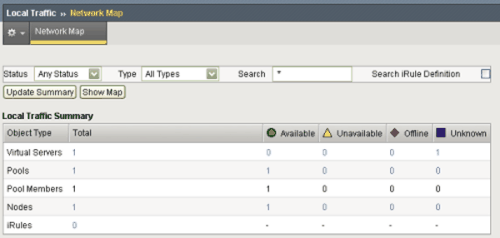
F5 BIG-IP Local Traffic Manager (LTM) is the traffic management component of F5’s Application Delivery and Security Platform (ADSP). It sits between clients and servers as a full proxy, using a preconfigured virtual server that points to a cluster of hosts and selecting destinations based on server performance, security, and availability.
LTM runs on F5 rSeries appliances and VELOS chassis, and as BIG-IP Virtual Editions on hypervisors and selected cloud providers. It makes real-time protocol and traffic decisions based on application and server conditions, and integrates with container orchestration through F5 Container Ingress Services.
Key features include:
- Load balancing and traffic steering: Distributes traffic across servers and clouds using static and dynamic load balancing, and steers various traffic types to resources designed for that workload.
- Health monitoring: Checks the health and performance of applications and resources so traffic is only sent to available servers.
- TCP optimization and caching: Optimizes TCP connections for mobile performance and offloads repetitive traffic from application servers through caching. It also load balances IoT clients using the MQTT protocol.
- SSL/TLS offload and key protection: Decrypts and encrypts inbound and outbound traffic, supports policy-based cipher suites and perfect forward secrecy, and protects keys with hardware security modules. Post-quantum cryptography support is also available.
- DDoS protection and ICAP integration: Detects DDoS attacks across more than 100 vectors and integrates with ICAP services for data loss prevention and virus scanning.
- Analytics and logging: Provides F5 Analytics for application monitoring, high-speed logging to remote servers, and data stream export to third-party analytics tools.
- iRules programmability: Uses a scripting language to modify, redirect, or inspect traffic at layers 4–7. The F5 AI Assistant can generate and refine iRules from natural language.
Limitations (as reported by users on G2):
- Dated web interface: The classic web UI looks outdated and can slow down when navigating large configurations, node lists, or certificate profiles.
- Steep learning curve: Discovering the full feature set takes time, and writing iRules and proxy policies requires a good understanding of the application.
- Licensing and module costs: Licensing and add-on module costs are high, which makes smaller staging environments harder to justify.
- Limited real-time logs in the GUI: Real-time traffic logs in the interface are considered unreliable, so some users rely on packet captures for troubleshooting.
- Release quality and patch frequency: Some users report bugs in code releases and find frequent software patches difficult to schedule around uptime requirements.
Source: F5
3. NetScaler

Best for: Single-pass ADC and WAF processing across hybrid and multi-cloud
Strengths: Common code base, one-pass architecture, IaC automation
Things to consider: Rising license costs, complex GUI navigation, upgrade planning
NetScaler is an application delivery and security platform for on-premises, hybrid cloud, multi-cloud, and cloud-native environments. It uses a common code base across all form factors and a single management plane, so teams can manage ADC operations consistently across environments.
NetScaler processes security and other ADC functions in a single pass to reduce latency, which applies in particular to web application firewall inspection. It supports infrastructure-as-code deployment and integrates with major public clouds, Kubernetes platforms, container orchestrators, and observability tools.
Key features include:
- One-pass architecture: Performs ADC and security functions simultaneously in a single processing pass, reducing the added latency of WAF inspection on each request.
- Common code base and single management plane: Runs the same code on every form factor and manages ADCs from one control point across hybrid and multi-cloud environments.
- Infrastructure-as-code automation: Deploys ADCs using an infrastructure-as-code approach and integrates with popular IaC tools, including support for blue-green and canary deployments with Terraform.
- Intent-based application delivery: Automates ADC lifecycle management based on policies teams define. Administrators describe the desired state declaratively instead of scripting each change.
- Application and API security: Protects applications and API endpoints across environments, including WAF inspection processed in the same pass as traffic management.
- Analytics and troubleshooting: Collects hundreds of network traffic data points to pinpoint performance and security issues and turns those insights into policy-based actions.
- Global server load balancing: Distributes traffic across geographically separated sites, with a published reference architecture for GSLB deployments.
Limitations (as reported by users on G2):
- License cost increases: Some users report that per-license costs have risen significantly since 2024, and advanced editions can be expensive for larger deployments.
- Complex console navigation: Features are spread across the console, which makes some settings hard to find and the product harder to learn.
- Log access: Certain detailed logs are not available in the GUI and require the CLI or a separate management console.
- Upgrade planning: Upgrades require careful planning, and some users have encountered issues after upgrading.
- Policy expression complexity: The move from classic to advanced policy expressions has made some configurations more challenging to write.
4. A10 Thunder ADC

Best for: Full-proxy L4–7 load balancing across many form factors
Strengths: aFleX scripting, GSLB, FlexPool licensing, full API coverage
Things to consider: GUI and upgrade process need work, limited support articles
A10 Thunder ADC is an application delivery controller that provides load balancing, acceleration, and integrated security for applications in data centers and hybrid clouds. It runs in hardware, virtual, cloud, bare metal, and container form factors, with license portability across multi-cloud deployments through FlexPool.
Thunder ADC integrates with A10 Control, A10’s centralized management and analytics platform, for per-application visibility into user experience, traffic profiles, and health checks. It also integrates with DevOps tooling through its REST API, Terraform, Ansible, and Kubernetes service discovery.
Key features include:
- Advanced server load balancing: Provides full-proxy L4–7 load balancing with traffic control, customizable health checks, and aFleX scripting for custom traffic handling.
- Global server load balancing (GSLB): Extends load balancing across data centers and clouds, directing users to healthy, local resources for business continuity.
- Application performance acceleration: Uses caching, including RAM caching, compression, TCP optimization, and TLS/SSL offloading with support for modern ECC ciphers.
- Web and DNS protection: Includes single sign-on, CAPTCHA, web application firewall capabilities, DNS firewall, and DDoS protection.
- Multi-tenancy: Supports isolated or high-density multi-tenant deployments with role-based access control for customizable policies and appliance consolidation.
- Per-application analytics: Integrates with A10 Control for application-level monitoring, and exposes metrics through a built-in Prometheus exporter for Grafana dashboards and alerting.
- DevOps integration: Offers 100% API coverage through aXAPI, CI/CD integration with Terraform and Ansible, and automated service discovery in Kubernetes through the Thunder Kubernetes Connector.
Limitations (as reported by users on PeerSpot):
- User interface: Users see room for improvement in the GUI.
- Upgrade process: Upgrades sometimes require contacting A10 to verify steps before proceeding.
- Support documentation: Users would like more detailed support articles on the A10 website.
- Configuration process: Some reviewers would like improvements in how configuration is handled.
5. Progress Kemp LoadMaster
Best for: Template-based L4–7 load balancing for virtual, hardware, and cloud
Strengths: Built-in WAF and IPS, GSLB, LoadMaster 360 analytics
Things to consider: Outdated GUI, basic logging, advanced features tied to tiers
Progress Kemp LoadMaster is a load balancer and application delivery controller available as virtual, hardware, cloud, and multi-tenant deployments. Virtual LoadMaster supports major application workloads with configuration templates and includes SSL offload, authentication, and traffic delivery options.
LoadMaster 360 adds centralized analytics, telemetry, and certificate lifecycle management across deployments. LoadMaster is licensed through subscription pooled licensing or perpetual licenses, with features such as WAF, GSLB, and the Edge Security Pack available in higher support tiers.
Key features include:
- Advanced L4–7 load balancing: Uses application templates, content matching and modification policies, application-aware health checks, and multi-tier virtual service routing to send requests to the best target.
- SSL/TLS handling and optimization: Provides SSL termination with multi-certificate SNI support, along with compression and caching.
- Global server load balancing: Steers traffic across distributed sites using location, proximity, and availability policies, with DNSSEC support, GSLB clustering, and IP range tagging.
- Layered security: Includes application-specific and general WAF rules, intrusion prevention, a Zero Trust Access Gateway, MFA and SSO, and pre-authentication with LDAP, RADIUS, X.509, Active Directory, RSA, and Kerberos. All products support FIPS 140-2.
- Insights and observability: LoadMaster 360 provides dashboards for application performance, health, and security, an Incident Center for identifying trends, unified authentication management, and WAF tuning and monitoring.
- Kubernetes Ingress Controller: Routes external traffic to Kubernetes clusters and automates endpoint configuration.
- Flexible licensing: Pooled subscriptions let teams assign, recover, and resize LoadMaster capacity across clouds and hypervisors on demand.
Limitations (as reported by users on G2):
- Outdated interface: Many users find the GUI dated and cluttered, with some advanced options hard to locate.
- Basic logging and analytics: Logs provide limited event detail, and deep traffic analysis often requires exporting data to external SIEM tools.
- Custom service configuration: Proxying custom services that lack a template can be difficult to configure correctly.
- Update stability: Some users have encountered bugs after firmware updates that affected production workloads, and some updates require planned downtime.
- Feature depth: Some reviewers consider the feature set more limited than other ADC platforms.
Cloud-Based Application Delivery Platforms
6. Cloudflare Load Balancing

Best for: Cloud-agnostic traffic steering across multi-cloud and on-prem
Strengths: Global health checks, geo-steering, failover, native WAF and Argo
Things to consider: Complex advanced configs, some features on higher-tier plans
Cloudflare Load Balancing directs traffic across servers, data centers, and cloud environments based on server health and user-to-origin latency, with global failover. It is vendor-neutral and balances traffic between AWS, GCP, Azure, and on-premises servers without requiring networking hardware or custom failover scripts.
The service runs on Cloudflare’s global network and works natively with the rest of the Cloudflare stack. Teams can route traffic with Argo, protect origins with the Cloudflare WAF, and manage everything from a single control plane.
Key features include:
- Health- and latency-based routing: Sends users to the fastest available origin and routes traffic away from unhealthy or overloaded servers.
- Distributed health checks: Monitors origin health from multiple locations across Cloudflare’s network to detect connectivity issues and trigger failover.
- Failover and resilience: Supports active/passive failover between two data centers or cloud regions.
- Geo-steering: Routes users to origins based on location for data sovereignty and localization requirements.
- Testing and deployments: Supports live A/B testing and canary deployments by controlling how traffic is split between origins.
- Multi-cloud traffic balancing: Balances traffic across multiple cloud providers and on-premises infrastructure to avoid dependence on one provider.
- Integrated delivery and security stack: Works with Cloudflare Argo, WAF, CDN, DDoS protection, rate limiting, and bot management through one control plane.
Limitations (as reported by users on G2):
- Advanced configuration complexity: Advanced settings can be complex for new users and come with a learning curve.
- Plan-based feature access: Some advanced features are only available on higher-tier plans.
- Debugging visibility: Debugging performance issues and understanding caching behavior can feel opaque.
- Onboarding changes: Getting started can require DNS and CNAME changes, which adds effort during migration.
- WAF tuning: Fine-tuning WAF and bot management rules to avoid false positives takes time for complex or dynamic applications.
7. Azure Front Door

Best for: Global HTTP load balancing and edge delivery for Azure apps
Strengths: Rules engine, WAF, bot and DDoS protection, Private Link origins
Things to consider: Costly at scale, weaker fit for hybrid and non-Azure setups
Azure Front Door is Microsoft’s cloud content delivery network service for delivering content, files, and global applications. It accelerates static and dynamic content on the Microsoft global network and provides global HTTP load balancing and failover across origins in Azure or on-premises infrastructure.
Front Door is a globally distributed, multi-tenant service that is not tied to a single Azure region. It is API-driven, integrates with Azure services such as Azure DNS and Azure Web Apps, and attaches security services including WAF, bot protection, and DDoS protection.
Key features include:
- Static and dynamic content acceleration: Delivers low-latency, high-throughput content from cloud or on-premises origins through Microsoft’s global network.
- Global HTTP load balancing and failover: Distributes HTTP traffic across origins and fails over to healthy endpoints, with instant scalability.
- Customizable rules engine: Extends routing behavior with a fully customizable rules engine.
- Integrated application security: Attaches web application firewall, bot protection, and DDoS protection to applications and content.
- Private Link support: Connects privately to application origins through Azure Private Link to support a zero trust model.
- Traffic and security analytics: Provides real-time analytics for monitoring and troubleshooting traffic and security events.
- Automated deployment: Supports automated deployment through cloud-native and DevOps tools. Supported protocols include HTTP, HTTPS, and HTTP/2.
Limitations (as reported by users on PeerSpot):
- Feature breadth and hybrid fit: Some users find the feature set narrower than other CDN platforms and the service less suited to hybrid environments.
- Cost at scale: Pricing can become expensive for large-scale projects with high transaction and user volumes.
- Setup considerations: Initial configuration can be somewhat complex, and static assets and APIs need to be handled differently.
- Overlapping services: The roles of Azure Front Door, Traffic Manager, and Application Gateway can be confusing to distinguish.
- Public-facing only: Users would like an option to use Front Door as an internal, private-facing entry point.
8. Akamai Ion

Best for: Accelerating dynamic websites and apps on a global edge network
Strengths: RUM-driven acceleration, script management, edge compute
Things to consider: Complex setup, short log retention, image compression sold separately
Akamai Ion is a web performance solution that delivers, accelerates, and optimizes websites and apps through Akamai Connected Cloud. User requests are routed through Akamai’s edge, where acceleration and caching are applied without requiring changes to origin content, and the service offloads traffic from origin systems.
Ion is backed by a 100% availability SLA. It integrates with Akamai mPulse real user monitoring and EdgeWorkers serverless computing, and supports developer workflows through web-based tools and APIs.
Key features include:
- Dynamic content acceleration: Routes around network bottlenecks and accelerates dynamic content on any device using network protocol optimizations, with caching to offload origin infrastructure.
- Adaptive acceleration from real user data: Uses machine learning analysis of real user monitoring data to continuously adjust performance optimizations for future requests.
- Script management: Applies automated controls to manage the performance impact of first-party and third-party scripts, including allowing or denying scripts that affect delivery.
- Device characterization: Detects device capabilities such as screen size and JavaScript support from the user agent, enabling device-specific responses and caching rules.
- Edge compute and developer tools: Lets development teams run serverless code at the edge and manage configurations through APIs and web-based tools integrated into existing workflows.
- Real user monitoring integration: Integrates with Akamai mPulse to measure the impact of Ion optimizations on real user page loads.
- Secure delivery: Delivers content over a PCI DSS compliant network with managed SAN, wildcard, and EV SAN certificates, customer-uploaded certificates, access control by IP, header, and authentication, and regional delivery options.
Limitations (as reported by users on PeerSpot):
- Complex initial setup: First-time configuration can be complicated because many front-end and back-end components are interdependent.
- Log retention and reporting: Log management shows data for about two months, and traffic reports could be more flexible.
- Configuration flexibility: Some users find the range of configuration options in Ion limited.
- Image compression unbundled: Image compression is no longer included in Ion and requires a separate product.
- Pricing and support response: Users describe the service as expensive and would like faster technical support responses.
Integrated application performance and delivery tools help organizations manage application availability, performance, traffic, and security through a coordinated delivery layer. Organizations should evaluate solutions based on layer 4–7 load balancing, global traffic management, application acceleration, real-time monitoring, automated failover, and integrated security controls. The right approach should match application architecture and deployment environments while providing enough visibility and automation to maintain consistent performance, respond to failures, and protect applications as traffic conditions change.