Summary: Web application firewall (WAF) tools inspect HTTP/S traffic to block SQL injection, XSS, bots, and Layer 7 DDoS. Radware Cloud WAF is best for hybrid and ADC-integrated deployments, Akamai App & API Protector suits edge protection at CDN scale, Imperva WAF suits teams that want managed rules in blocking mode, and AWS WAF suits AWS-hosted apps.
What are Web Application Firewall (WAF) Tools?
Top web application firewall (WAF) tools protect websites and APIs from threats like SQL injection, cross-site scripting (XSS), and zero-day exploits. They monitor, filter, and block malicious HTTP and HTTPS traffic between users and web applications. WAF tools operate at the application layer (Layer 7) of the OSI model.
Unlike traditional network firewalls, which primarily filter traffic based on IP addresses, ports, and protocols, WAF tools inspect web requests and their contents. They analyze elements such as HTTP headers, URLs, query parameters, cookies, and request bodies to identify suspicious activity. WAF tools use predefined security rules, attack signatures, behavioral analysis, and rate limiting to detect and prevent threats.
In this article:
The table below summarizes the key differences between the leading web application firewall tools. We explore each tool in more detail in the sections that follow.
| Category |
Solution |
Best For |
Key Strengths |
Things to Consider |
| Enterprise and Hybrid WAF Platforms |
Radware Cloud WAF |
Protecting applications and APIs across cloud, multi-cloud, hybrid, on-premises, and Kubernetes environments |
AI-powered behavioral protection, continuously adaptive policies, and integrated API, bot, and DDoS protection |
Pricing, third-party integrations, and multilingual training could improve |
| Enterprise and Hybrid WAF Platforms |
Akamai App & API Protector |
Edge WAF with bot, API, and L7 DDoS |
Self-tuning Adaptive Security Engine |
Higher cost, bot tuning effort |
| Enterprise and Hybrid WAF Platforms |
Imperva Web Application Firewall |
Managed rules with fast blocking-mode rollout |
SOC-tested rules, ML Attack Analytics |
Complex configuration, per-environment licensing |
| Enterprise and Hybrid WAF Platforms |
F5 WAF for BIG-IP |
BIG-IP users on software, cloud, or hardware |
Behavioral L7 DoS, API protocol security |
High cost, less intuitive dashboards |
| Enterprise and Hybrid WAF Platforms |
Fortinet FortiWeb |
Fortinet Security Fabric environments |
ML detection, API discovery, bot deception |
Harder to integrate with non-Fortinet tools |
| Cloud-Native WAF Services |
Cloudflare WAF |
Edge WAF with fast, API-driven setup |
Network-wide managed rules, CVE virtual patching |
No on-prem option, tiered features |
| Cloud-Native WAF Services |
AWS WAF |
Web apps and APIs running on AWS |
Managed rules, protection packs, bot control |
Custom rules and pricing can be confusing |
| Cloud-Native WAF Services |
Azure Web Application Firewall |
Web apps and APIs hosted on Azure |
Managed rule sets, Azure Policy and Sentinel |
Specific SKUs required, unclear docs |
Related content: Read our guide to WAF according to Gartner.
Cloud-Based WAF Tools
Cloud-based WAF tools are hosted and managed by third-party providers. They filter incoming HTTP and HTTPS traffic before it reaches the protected web application. Most operate as reverse proxies, routing requests through the provider's infrastructure to detect and block malicious traffic.
These tools typically provide:
- Managed security rules
- Automatic threat intelligence updates
- Bot protection
- Distributed denial-of-service (DDoS) mitigation
They can scale to handle traffic spikes without requiring organizations to deploy additional hardware. However, they depend on the provider's infrastructure and may offer less control over traffic inspection and data handling.
Network-Based and Hardware WAF Tools
Network-based WAF tools are deployed as dedicated hardware appliances within an organization's network infrastructure. They inspect incoming web traffic before forwarding requests to application servers. These appliances are commonly installed in data centers where organizations require direct control over security policies and traffic processing.
Hardware WAF tools can provide high throughput and low latency through dedicated processing resources. They also allow organizations to keep traffic inspection within their own infrastructure. However, they require upfront hardware investments, ongoing maintenance, and capacity planning. Scaling protection may involve purchasing and configuring additional appliances.
Host-Based and Software WAF Tools
Host-based WAF tools run as software on the same server or within the same environment as the protected application. They can be integrated with web servers such as Apache and Nginx or deployed as:
- Modules
- Agents
- Software-based reverse proxies
These tools provide detailed control over security rules and can inspect requests close to the application. They are useful for organizations that need custom filtering policies or want to manage WAF protection within their existing infrastructure. However, they consume server resources and require administrators to manage updates, configuration, and performance.
Hybrid WAF Solutions
Hybrid WAF solutions combine multiple deployment models, such as cloud-based filtering and on-premises WAF appliances. They allow organizations to distribute traffic inspection across different environments while maintaining consistent security policies.
For example, a hybrid deployment may use a cloud WAF to block large-scale attacks and malicious bots before traffic reaches the network. An on-premises WAF can then apply application-specific rules and inspect requests that require more detailed analysis.
Hybrid WAF solutions are useful for organizations operating applications across:
- Cloud platforms
- Private data centers
- Hybrid infrastructure
They offer flexibility in traffic routing and security enforcement but introduce additional configuration and management complexity. Organizations must coordinate rules, logging, and monitoring across the different WAF components to avoid inconsistent protection.
SQL Injection (SQLi)
SQL injection (SQLi) attacks occur when attackers insert malicious SQL commands into application inputs, such as form fields, URL parameters, or API requests. If an application fails to validate inputs or uses unsafe database queries, attackers may be able to access, modify, or delete sensitive data.
How WAF tools help: They prevent SQL injection by inspecting incoming requests for suspicious SQL syntax, known attack patterns, and unusual input structures. They can block requests containing malicious payloads before they reach the application. However, WAF protection should complement parameterized queries and secure database access practices.
Cross-Site Scripting (XSS)
Cross-site scripting (XSS) attacks involve injecting malicious scripts into web pages or application responses. When executed in a user's browser, these scripts can steal session information, manipulate page content, or perform unauthorized actions within the application's security context.
How WAF tools help: They detect potential XSS attacks by examining request parameters, headers, and submitted content for suspicious scripts and encoding patterns. They use attack signatures and filtering rules to block known payloads. However, applications still need proper output encoding, input validation, and browser security controls to prevent XSS vulnerabilities.
Cross-Site Request Forgery (CSRF)
Cross-site request forgery (CSRF) attacks trick authenticated users into performing unintended actions on web applications. For example, an attacker may create a malicious page that causes a user's browser to submit a request to change account settings or initiate a transaction using an existing authenticated session.
How WAF tools help: They can detect suspicious cross-origin requests by inspecting HTTP headers, request methods, cookies, and traffic patterns. Some solutions can enforce origin validation or other request restrictions. However, WAF tools cannot reliably prevent all CSRF attacks. Applications should implement CSRF tokens, appropriate SameSite cookie settings, and origin verification.
Remote Code Execution (RCE)
Remote code execution (RCE) vulnerabilities allow attackers to execute unauthorized commands or code on application servers. These vulnerabilities may result from insecure file uploads, command injection, unsafe deserialization, or flaws in application frameworks and dependencies.
How WAF tools help: They help mitigate RCE attacks by detecting suspicious command sequences, exploit signatures, and malicious request payloads. They can block requests that attempt to exploit known vulnerabilities before the application processes them. However, WAF filtering cannot guarantee protection against every RCE technique, making software patching and secure application design essential.
Zero-Day Web Application Attacks
Zero-day attacks exploit previously unknown vulnerabilities or security flaws for which patches are not yet available. Attackers may use these vulnerabilities to bypass authentication, access sensitive information, or compromise application servers before security teams can deploy fixes.
How WAF tools help: They can provide temporary protection through virtual patching, which uses security rules to block requests that exploit vulnerabilities without changing application code. Behavioral analysis and anomaly detection may also identify unusual requests associated with unknown attacks. However, protection depends on whether the WAF can recognize the exploit's characteristics, and sophisticated zero-day attacks may bypass existing rules.
Automated Bot Attacks and Credential Stuffing
Automated bot attacks use scripts or specialized software to perform large numbers of requests against web applications. Credential stuffing is a common example in which attackers test stolen username and password combinations across login endpoints to gain unauthorized access to user accounts.
How WAF tools help: They help detect and limit automated attacks through rate limiting, IP reputation analysis, behavioral detection, and bot management features. Advanced solutions can distinguish legitimate automated traffic from malicious activity using browser signals, request patterns, and challenge mechanisms. These controls reduce automated abuse but work best alongside multifactor authentication and compromised credential detection.
Application-Layer DDoS Attacks
Application-layer distributed denial-of-service (DDoS) attacks target web application resources by overwhelming servers with HTTP or HTTPS requests. Unlike network-layer DDoS attacks, these attacks may use requests that resemble legitimate user activity, making them harder to distinguish from normal traffic.
How WAF tools help: They help mitigate application-layer DDoS attacks by analyzing request rates, traffic patterns, source reputation, and resource usage. They can block suspicious requests, apply rate limits, or challenge clients before forwarding traffic to application servers. Cloud-based WAF solutions may also integrate with larger DDoS protection networks to absorb high-volume attacks.
API Abuse and Business Logic Attacks
API abuse occurs when attackers misuse application programming interfaces to access unauthorized data, exhaust resources, or exploit weaknesses in API endpoints. Business logic attacks manipulate legitimate application workflows, such as repeatedly applying discounts, bypassing purchase limits, or exploiting flaws in transaction sequences.
How WAF tools help: With API security capabilities, they can inspect API requests, enforce rate limits, validate request structures against API schemas, and detect unusual access patterns. Some solutions also identify sensitive endpoints and suspicious sequences of requests. However, attacks that use valid requests within permitted workflows can be difficult to detect. Effective protection requires application-level authorization checks, business rule validation, and monitoring alongside WAF controls.
AI-Powered Threat Detection and Behavioral Analysis
Advanced WAF tools use machine learning and behavioral analysis to identify malicious traffic that traditional signature-based detection may miss. These capabilities analyze request patterns, user behavior, traffic frequency, and other signals to distinguish legitimate activity from potential attacks. Behavioral analysis helps detect threats such as:
- Automated abuse
- Unusual API access
- Attempts to exploit application vulnerabilities
Some WAF tools establish baselines of normal application traffic and flag deviations that indicate suspicious activity. This approach can improve detection of previously unseen attacks, although models require tuning to reduce false positives.
Automated WAF Policy Generation and Optimization
Automated policy generation allows WAF tools to create and refine security rules based on observed application traffic. Instead of requiring administrators to configure every rule manually, these tools analyze request patterns, application endpoints, and common user interactions to recommend appropriate protection settings. Policy optimization features can:
- Identify rules that generate excessive false positives
- Detect gaps in protection
- Suggest adjustments
Some solutions support staged rule deployment, allowing administrators to monitor a rule's impact before enabling blocking. This reduces manual configuration work and helps maintain security as applications change.
Positive and Negative Security Models
WAF tools use positive and negative security models to determine which requests should be allowed or blocked. A positive security model follows an allowlist approach, permitting requests that match defined application behavior, such as:
- Approved URLs
- HTTP methods
- Parameter types
- Expected input formats.
A negative security model uses a blocklist approach to identify and reject requests containing known malicious patterns, attack signatures, or suspicious content. Advanced WAF tools often combine both models. Negative rules provide broad protection against known threats, while positive rules enforce stricter controls on sensitive application endpoints.
OWASP Top 10 Vulnerability Protection
Advanced WAF tools provide security rules designed to mitigate attacks associated with the OWASP Top 10, a widely used reference for critical web application security risks. These tools can detect and block common exploitation attempts involving:
- Injection vulnerabilities
- Cross-site scripting
- Certain access control weaknesses
Many solutions include managed rule sets based on the OWASP Core Rule Set (CRS), which provides detection patterns for common web attacks. Administrators can adjust rule sensitivity and exclusions to match application requirements. However, WAF tools cannot fully address every OWASP Top 10 category, particularly risks involving insecure design, cryptographic failures, or server-side security misconfigurations.
Zero-Day Attack Detection and Mitigation
Zero-day protection capabilities help WAF tools identify and mitigate attacks targeting vulnerabilities that are not yet publicly documented or patched. Advanced solutions can recognize suspicious requests without relying entirely on known attack signatures, combining:
- Anomaly detection
- Behavioral analysis
- Generic exploit detection rules
Virtual patching is another important capability. It allows security teams to deploy WAF rules that block exploitation attempts against vulnerable application components while developers prepare permanent fixes. Although virtual patching can reduce exposure, it does not eliminate the underlying vulnerability or guarantee protection against every exploit variation.
API Discovery and Protection
API discovery capabilities help organizations identify exposed API endpoints, including undocumented or previously unknown interfaces. Advanced WAF tools analyze HTTP traffic to detect API paths, request methods, parameters, and usage patterns. This visibility helps security teams identify endpoints that may lack appropriate protection. API protection features can:
- Enforce request schema validation
- Restrict unsupported HTTP methods
- Inspect JSON and XML payloads
- Apply endpoint-specific rate limits
Some solutions support OpenAPI specifications to validate incoming requests against defined API structures. These controls help prevent malformed requests, automated API abuse, and certain injection attacks, but application-level authorization remains necessary.
Advanced Bot Detection and Mitigation
Advanced bot detection identifies automated traffic and distinguishes malicious bots from legitimate users and authorized automated services. WAF tools evaluate signals such as request frequency, browser characteristics, IP reputation, navigation patterns, and client behavior to identify suspicious automation. Bot mitigation features may include:
- Rate limiting
- JavaScript challenges
- CAPTCHA verification
- Automated request blocking
Some solutions assign risk scores to individual requests or sessions and apply different responses based on the detected threat level. This helps reduce scraping, inventory hoarding, spam submissions, and automated account abuse without unnecessarily blocking legitimate traffic.
Layer 7 DDoS Protection
Layer 7 DDoS protection focuses on attacks that overwhelm web applications with large volumes of HTTP or HTTPS requests. These attacks target application resources such as login pages, search functions, and database-backed endpoints rather than only consuming network bandwidth.
Advanced WAF tools identify application-layer flooding by analyzing:
- Traffic rates
- Request distribution
- Session behavior
- Endpoint usage
Mitigation features include adaptive rate limiting, traffic challenges, request filtering, and automated blocking. Cloud-based solutions may combine these controls with distributed traffic processing infrastructure to handle large attack volumes.
Account Takeover and Credential Stuffing Protection
Account takeover protection helps detect attempts to gain unauthorized access to user accounts through stolen credentials, password spraying, or automated login attacks. Credential stuffing attacks are particularly difficult to identify because attackers often use valid username and password combinations obtained from previous data breaches. Advanced WAF tools monitor authentication traffic for:
- Unusual login frequency
- Repeated failures
- Suspicious IP addresses
- Abnormal session behavior
Some solutions use device fingerprinting, bot detection, and compromised credential intelligence to identify high-risk login attempts. They can respond with rate limits, authentication challenges, or temporary blocking. These controls complement multifactor authentication and application-level account security measures.
Real-Time Threat Intelligence and Analytics
Real-time threat intelligence allows WAF tools to incorporate information about emerging attacks, malicious IP addresses, known exploit techniques, and suspicious traffic sources. Cloud-based WAF providers may aggregate threat data across multiple protected applications to identify attack campaigns and distribute updated detection rules. Analytics and reporting features provide visibility into:
- Blocked requests
- Attack categories
- Targeted endpoints
- Traffic trends
- Security rule performance
Security teams can use dashboards and detailed request logs to investigate incidents, identify recurring threats, and adjust protection policies. Many advanced WAF tools also integrate with security information and event management (SIEM) platforms through APIs or log streaming to support centralized monitoring and incident response.
How we selected these tools: We shortlisted web application firewall tools based on OWASP Top 10 coverage, API and bot protection, Layer 7 DDoS mitigation, deployment flexibility, and automated policy management.
Enterprise and Hybrid WAF Platforms
1. Radware Cloud WAF
Best for: Enterprises needing adaptive, fully managed WAF protection for applications and APIs across cloud, multi-cloud, hybrid, on-premises, and Kubernetes environments
Strengths: AI-powered behavioral protection, continuously adaptive policies, integrated API and bot protection, and expert-managed security services
Things to consider: PeerSpot users report that pricing, third-party integrations, and multilingual training could be improved
Radware Cloud WAF service is an AI-powered, cloud-delivered web application firewall that protects web and mobile applications and APIs against the OWASP Top 10, zero-day exploits, malicious bots, application-layer DDoS attacks, account takeover attempts, and other application threats. It is part of Radware Cloud Application Protection Services, an integrated application security platform that can also provide API security, bot management, client-side protection, Web DDoS protection, and threat intelligence.
The service combines a negative security model for detecting known attack patterns with an AI-powered, behavioral positive security model that learns legitimate application activity. It automatically maps protected applications, identifies changes and potential vulnerabilities, and continuously adapts security policies to block malicious deviations while reducing false positives and manual policy tuning.
Radware Cloud WAF can protect applications hosted in public clouds, private clouds, multi-cloud and hybrid environments, on-premises infrastructure, virtual environments, and Kubernetes. Organizations can use Radware’s globally distributed points of presence to place protection close to application servers while relying on managed security experts and emergency response services to reduce the operational burden on internal security teams.
Key features include:
- Adaptive positive and negative security models: Combines attack-pattern detection with AI-powered behavioral analysis to stop known attacks, anomalous activity, zero-day exploits, and traffic that deviates from legitimate application behavior.
- Automatic traffic learning: Analyzes production traffic to learn legitimate application behavior and distinguish malicious activity without relying exclusively on static signatures or extensive manual rule creation.
- Continuous application mapping: Automatically maps protected applications, detects application and code changes, identifies potential vulnerabilities, and adjusts protection as the application evolves.
- Adaptive security policies: Continuously fine-tunes security policies and threat profiles to improve detection accuracy, reduce false positives, and move applications from monitoring to blocking with less manual intervention.
- Integrated API protection: Discovers and catalogs APIs from runtime traffic, including shadow, outdated, third-party, and deprecated APIs. It protects APIs against embedded attacks, business logic abuse, API-focused bots, unauthorized activity, and HTTP DDoS attacks.
- OWASP threat coverage: Protects against major OWASP web application and API risks, including injection, cross-site scripting, authentication attacks, access-control failures, security misconfigurations, and API business logic abuse.
- Cross-module threat correlation: Uses AI to correlate activity detected by WAF, API security, bot management, DDoS protection, and other security modules, creating a broader attack narrative and helping block malicious sources proactively.
- Automated security analytics: Consolidates related alerts and events into manageable user activities, helping security teams investigate attacks without manually reviewing large volumes of disconnected events.
- Integrated application protection services: Can be combined with bot management, account takeover protection, API security, client-side protection, Web DDoS protection, and threat intelligence through Radware Cloud Application Protection Services.
- Flexible hybrid and multi-cloud protection: Provides consistent application security across virtual infrastructure, public and private clouds, multi-cloud environments, on-premises systems, and Kubernetes deployments.
- Managed security service: Gives organizations access to Radware security specialists and emergency response capabilities, reducing the policy-management and incident-response workload placed on internal teams.
Limitations (as reported by users on PeerSpot):
- Pricing: Some users consider the service expensive and report that its pricing may place it outside the budgets of smaller organizations.
- Third-party integrations: Users have requested broader and more streamlined integrations with tools such as Azure DevOps and other security and development platforms.
- Training and language support: Users have asked for additional training and support resources in languages other than English.
2. Akamai App & API Protector

Best for: Organizations wanting WAF, bot, API, and L7 DDoS at the CDN edge
Strengths: Self-tuning Adaptive Security Engine with managed rule updates
Things to consider: Higher cost; bot tuning often needs Akamai support time
Akamai App & API Protector is a web application firewall that inspects every request at the Akamai edge in real time. It defends against DDoS attacks, web application and API attacks, and malicious bots. The product combines WAF, Layer 7 DDoS defense, API discovery, sensitive data protection, and bot controls in a single solution.
App & API Protector Hybrid extends the WAF beyond the Akamai edge to on-premises, hybrid cloud, and multi-CDN environments, covering both north-south and east-west traffic. Akamai offers fully managed, co-managed, and self-service support options.
Key features include:
- Adaptive Security Engine: Learns attack patterns and updates security policies using global threat intelligence. Automatically pushes protections for zero-days, CVEs, OWASP Top 10 threats, and API exploits.
- Behavioral DDoS Engine: Detects and mitigates sophisticated Layer 7 DDoS attacks automatically.
- API discovery and protection: Discovers APIs and protects against the OWASP API Top 10, including protection of sensitive data passed through APIs.
- Self-tuning and threat scoring: Uses machine learning to tune protections and reduce false positives, combined with intelligent threat scoring.
- Hybrid deployment: Extends WAF policies to on-premises, multicloud, and multi-CDN environments to keep policies consistent across architectures.
- DevOps integration: Supports configuration through a GUI, open APIs, the Akamai CLI, a Terraform provider, and a public Postman collection for CI/CD pipelines.
- Malware protection: Scans uploaded files at the edge before they reach the origin, as an add-on module.
- SIEM integration and dashboards: Provides connectors for Splunk and other SIEM platforms, along with AI-powered dashboards that surface anomalies and recommend improvements.
Limitations (as reported by users on PeerSpot):
- Cost: Users describe pricing as higher than many other providers, with usage-based costs that need monitoring.
- Tuning effort: Bot management can require extensive fine-tuning, often with Akamai support. Traffic surges during planned events may require manual configuration changes to avoid false positives.
- Rule documentation: Documentation on rule precedence is unclear, which makes troubleshooting conflicting rules difficult.
- Analytics and reporting: Some users would like better analytics and reporting visibility in the console.
3. Imperva Web Application Firewall

Best for: Teams wanting managed rules and fast deployment in blocking mode
Strengths: SOC-tested managed rules and ML-based Attack Analytics
Things to consider: Complex configuration; licensing counts each environment
Imperva Web Application Firewall protects applications and APIs in public cloud, private cloud, hybrid, and on-premises environments. The Imperva Threat Research team writes managed rules, tests them in production, and pushes them to customers with daily updates plus real-time updates for critical threats.
Imperva offers three deployment options. Cloud WAF is a SaaS service managed through the Imperva Management Console. WAF Gateway is deployed and managed locally for legacy applications and data sovereignty requirements. Elastic WAF is deployed on Kubernetes and managed through SaaS for cloud-native applications.
Key features include:
- Managed rules: Covers SQL injection, XSS, and other OWASP Top 10 attacks with rules that Imperva researchers create and test before deployment.
- Attack Analytics: Uses machine learning to correlate thousands of security alerts into incident narratives that include attack origin, methods, and severity.
- Automated policy creation: Creates policies and propagates rules automatically. Administrators can also define custom policies for bots and access control.
- Infrastructure as code: Provides a Terraform provider and modular Terraform configurations to automate Cloud WAF deployment and management.
- Enterprise SSL management: Manages SSL connections with automated certificate renewal, domain validation, and centralized visibility.
- Upload Scan and Control: Validates, scans, and controls uploaded files before they reach application backends.
- Integrated bot and API protection: Combines bot protection and API security with WAF inside Cloud WAF.
- Compliance support: Provides logging, auditing, and access controls that support PCI DSS, GDPR, HIPAA, ISO 27001, and NIST requirements.
Limitations (as reported by users on G2):
- Complex configuration: Some users find the configuration complex, with many hidden options that require security expertise.
- Learning curve: New users report difficulty understanding how to navigate the interface.
- Licensing model: Licensing counts staging and production URLs separately, which increases costs in multi-environment setups.
- Setup time: Initial setup and configuration can take significant time and technical knowledge.
4. F5 WAF for BIG-IP

Best for: BIG-IP customers needing software, cloud, or hardware WAF
Strengths: Behavioral L7 DoS, API protocol security, in-browser encryption
Things to consider: High licensing cost and less intuitive dashboards
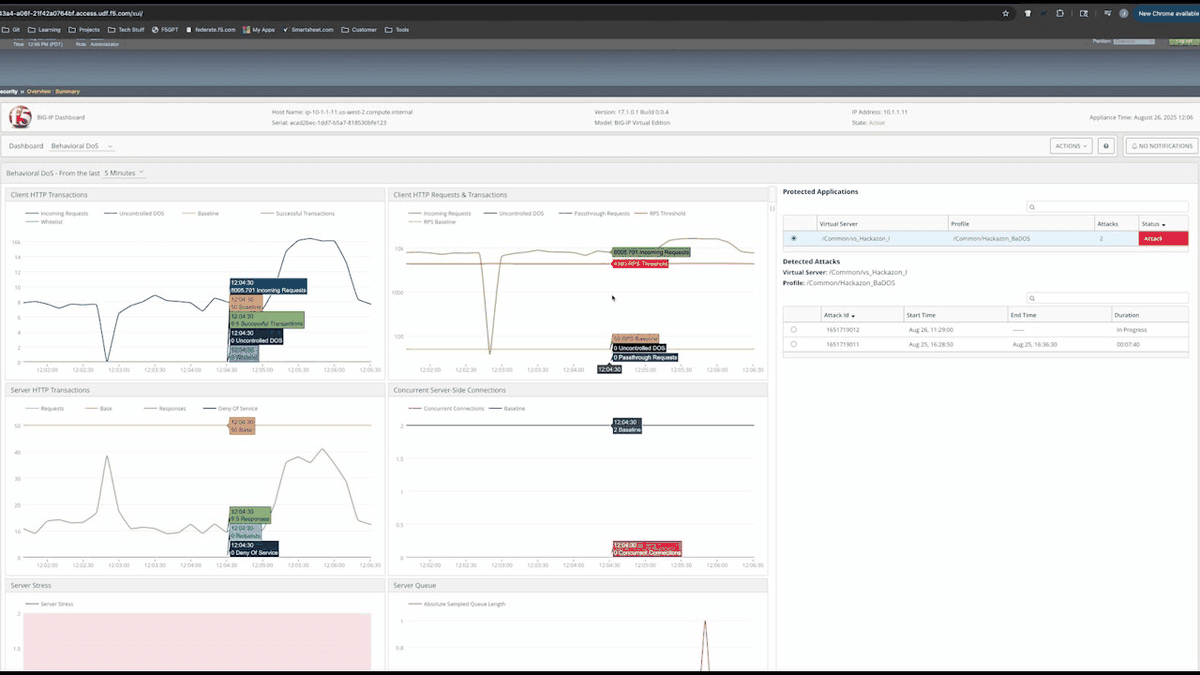
F5 WAF for BIG-IP, formerly BIG-IP Advanced WAF, protects applications, APIs, and data against zero-day vulnerabilities, application-layer DoS attacks, threat campaigns, application takeover, and bots. It can run as software on leading hypervisors, in AWS, Microsoft Azure, and Google Cloud marketplaces with pay-as-you-go or bring-your-own-license options, or on F5 hardware.
The product includes a dashboard that tracks compliance against OWASP Top 10 threats. It also provides guided configurations for common WAF use cases, a learning engine for building policies, and granular policies for microservices and APIs.
Key features include:
- Behavioral DoS protection: Uses behavioral analytics and machine learning to detect and mitigate Layer 7 DoS attacks.
- API protocol security: Secures GraphQL, REST/JSON, XML, and GWT APIs. Also protects Model Context Protocol (MCP) traffic against OWASP MCP Top 10 vulnerabilities.
- In-browser data encryption: Encrypts data at the application layer to protect against data-extracting malware and man-in-the-browser attacks.
- Stolen credential protection: Blocks brute force attacks that use stolen credentials.
- Proactive bot defense: Protects applications from automated attacks by bots and other malicious tools.
- Threat campaign detection: Combines machine learning and threat intelligence to identify active attack campaigns that are hard to spot from individual requests.
- Security as code: Supports declarative, API-based deployment and configuration for DevOps pipelines.
- Scanner and SIEM integration: Imports DAST and SAST scan results to update signatures and streams telemetry to SIEM, SOAR, and XDR platforms.
Limitations (as reported by users on PeerSpot):
- Pricing: Users describe licensing as expensive, especially for small and medium-sized organizations.
- Dashboards and reporting: Some users find the dashboards less user-friendly than competing products and the reporting unclear.
- API customization: Customizing protection for specific APIs can be difficult.
- Setup duration: Initial setup is straightforward but can be a lengthy process.
Source: F5
5. Fortinet FortiWeb

Best for: Fortinet Security Fabric users needing appliance, VM, or cloud WAF
Strengths: Dual-layer ML, API discovery, bot deception, client-side protection
Things to consider: Harder to integrate with non-Fortinet products
Fortinet FortiWeb protects web applications and APIs from OWASP Top 10 threats, bots, and DDoS attacks. It is available as hardware appliances with protected throughput from 100 Mbps to 70 Gbps, virtual machines on platforms such as VMware, Hyper-V, and KVM, container appliances, and public cloud images for AWS, Azure, Google Cloud, and Oracle.
Fortinet’s SaaS WAF, previously FortiWeb Cloud, is now delivered as FortiAppSec Cloud, which also includes advanced bot protection and global server load balancing. FortiWeb includes FortiAI-Assist for forensics and a built-in SOC agent, and supports usage-based licensing through the FortiFlex program.
Key features include:
- Dual-layer machine learning: Models each application to identify malicious patterns, detect zero-day attacks, and reduce false positives.
- API discovery and protection: Discovers APIs from application traffic and generates a positive security policy for each schema (OpenAPI, XML, JSON). Integrates API security into CI/CD pipelines.
- Bot defense: Uses bot deception, biometric detection, and machine learning to block malicious bots while allowing search engines and monitoring tools.
- Client-side protection: Detects third-party script injection, DOM manipulation, and form hijacking in the browser, which supports PCI DSS script monitoring requirements.
- Security Fabric integration: Shares threat data with FortiGate firewalls and FortiSandbox to defend against advanced persistent threats.
- Threat analytics and FortiAI-Assist: Consolidates event data into prioritized incidents, with recommended playbooks and threat-hunting capabilities.
- Hardware acceleration: Uses hardware-based SSL processing on appliances for traffic encryption and decryption.
- FortiGuard services: Adds subscription services such as antivirus, AI-based inline malware prevention, and anti-botnet protection.
Limitations (as reported by users on PeerSpot):
- Third-party integration: Users report that integrating FortiWeb with non-Fortinet products can be difficult.
- Logging: Some users would like improvements in logging capabilities.
- Management interface: Users note a learning curve and would like better centralized management of multiple devices.
- Documentation and support: Some users report that configurations do not always work as documented and that support response times could be faster.
Cloud-Native WAF Services
6. Cloudflare WAF

Best for: Teams wanting edge WAF with fast setup and API-driven management
Strengths: Network-wide managed rules and rapid virtual patching for CVEs
Things to consider: No on-prem option; plan tiers gate some features
Cloudflare WAF inspects HTTP/S requests at the edge using managed and custom rules to block malicious payloads before they reach the application. The WAF runs across Cloudflare’s global network, so inspection happens close to the user. It is fully manageable through an API, which allows integration into CI/CD workflows.
When a new vulnerability emerges, Cloudflare’s security team writes a rule and deploys it across the entire network. Cloudflare tunes its managed rulesets against large volumes of traffic to reduce false positives.
Key features include:
- Managed and custom rules: Combines Cloudflare-maintained rulesets with custom rules for application-specific filtering.
- OWASP Top 10 protection: Blocks SQL injection, XSS, and other OWASP Top 10 attacks targeting web applications and APIs.
- Virtual patching for CVEs: Deploys rules that block exploits for newly announced CVEs in libraries and frameworks before applications are patched.
- Content scanning for uploads: Routes file-upload endpoints through WAF Content Scanning so teams can quarantine or rewrite dangerous files.
- Automated security updates: Updates rules automatically to cover emerging threats without manual changes.
- API-based management: Supports configuration through the Cloudflare API for automation and CI/CD pipelines.
- Integration with Cloudflare security services: Works alongside Cloudflare DDoS protection, rate limiting, Bot Management, Turnstile, and client-side security.
Limitations (as reported by users on PeerSpot):
- Detection accuracy: Some users would like fewer false negatives in detection.
- Support quality: Some users rate technical support as moderate.
- Pricing tiers: Users note that additional features can add cost for smaller organizations and would like a mid-tier pricing option.
- Deployment model: Cloudflare does not offer an on-premises deployment option.
7. AWS WAF

Best for: Teams running web applications and APIs on AWS
Strengths: Managed rules, preconfigured protection packs, bot control
Things to consider: Custom rules and pricing can be confusing
AWS WAF lets teams create security rules that block common attack patterns such as SQL injection and XSS and control bot traffic. Rules can filter requests based on IP addresses, HTTP headers and body, or custom URIs.
AWS WAF provides a consolidated interface with guided, single-page onboarding. Preconfigured protection packs supply rule templates for several industries and workload types such as APIs, PHP applications, and web services. The service also provides continuous security recommendations.
Key features include:
- Managed rules: Applies AWS-maintained rule groups that block common exploits without manual rule writing.
- Custom traffic filtering: Creates rules based on IP addresses, HTTP headers, request body, and URIs.
- Bot control: Monitors, blocks, or rate-limits common bot traffic.
- Account takeover prevention: Monitors login pages for access attempts using compromised credentials and signup pages for fake account creation by bots or disposable email addresses.
- Automatic Layer 7 DDoS protection: Monitors for application-layer DDoS events and mitigates them within seconds.
- Protection packs: Provides preconfigured protection templates for industries and workload types.
- AI bot monetization: Collects payments from AI bots and agents that access content and APIs through Coinbase’s x402 Facilitator, with per-content pricing and payment verification at the edge.
- Centralized visibility: Combines core security functions and partner protections in a single interface for monitoring and response.
Limitations (as reported by users on PeerSpot):
- False positives: Some users report false positives from managed signature sets.
- Custom rule complexity: Writing custom rules can be difficult.
- Cost management: Users note that costs grow with the number of rules and would like better cost management.
- User interface: Some users find the interface lacking compared to dedicated WAF products.
8. Azure Web Application Firewall
Best for: Organizations protecting web apps and APIs hosted on Azure
Strengths: Managed rule sets, Azure Policy, Sentinel and Monitor integration
Things to consider: Requires specific SKUs; deployment docs can be unclear
Azure Web Application Firewall is a cloud-native WAF service that protects web applications and APIs from OWASP Top 10 security risks, bot attacks, and DDoS attacks. It applies custom and managed rule sets at the network edge and in datacenters.
Azure WAF requires no software agent. Administrators define and customize rules centrally and apply them across all protected web apps. It is available with pay-as-you-go pricing and no upfront costs.
Key features include:
- Managed rule sets: Combines the Azure WAF detection engine with updated rule sets to block common exploits and reduce false positives.
- Custom rules: Supports custom rules configured in the Azure portal for application-specific requirements.
- Bot and DDoS protection: Defends against malicious bots and DDoS attacks. Azure DDoS Protection can be enabled on the virtual network where Azure Application Gateway is deployed.
- Azure Front Door integration: Delivers WAF protection at the edge together with Azure Front Door content delivery.
- Microsoft Sentinel integration: Feeds WAF data into Microsoft Sentinel for security analytics.
- Azure Monitor logging: Tracks security alerts and diagnostic logs with detailed reporting on detected threats.
- Azure Policy compliance: Enforces organizational standards and assesses compliance for WAF resources at scale.
- REST API automation: Automates WAF configuration through REST APIs for DevOps processes.
Limitations (as reported by users on PeerSpot):
- Documentation: Users report a lack of clarity around the multiple deployment options and limited tutorials.
- SKU requirements: The WAF requires specific hosting SKUs, which affects deployment planning.
- Cost: Some users consider the service expensive.
- Reporting: Users would like improvements in reporting and management workflows.
Effective web application firewall tools combine application-layer traffic inspection with adaptive controls for known and emerging threats. Organizations should evaluate solutions based on OWASP Top 10 coverage, zero-day mitigation, API protection, bot detection, layer 7 DDoS defense, automated policy management, and deployment flexibility. The right WAF should integrate with existing infrastructure and security operations while providing enough visibility and tuning controls to block malicious traffic without disrupting legitimate application activity.